• Home
  • Software Testing Service
  • About US
    • Privacy Policy
    • Disclosure
  • Write For Us
  • Submit Software
  • Contact Us
    • Subscribe
I Love Free Software
Best free software available all over the web. The free software categories include Windows Software, Social Networking Tools, and software installation videos.


  • Featured
  • Windows
  • Web Applications
  • App Store
  • Android
  • iPhone
  • iPad
  • Windows 8
  • Social Networking
  • Programming Tools

ReadFresh: Keep Track of Updates to Websites in Real Time

By Ishan Bansal on March 16, 2010 | Sponsored Links

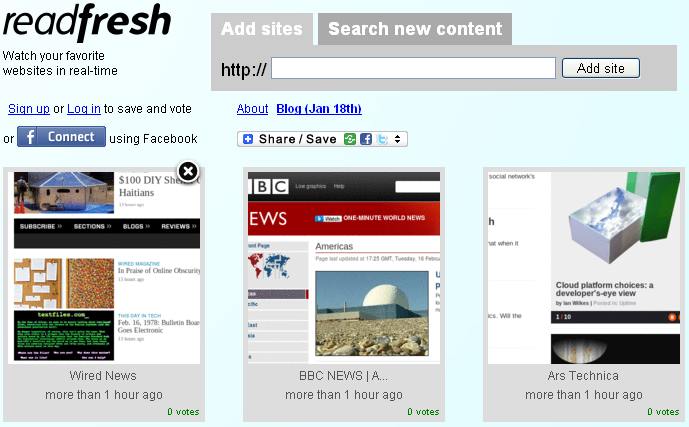
ReadFresh lets you keep track of your favorite websites in real time. You add the websites to ReadFresh that you want to track. ReadFresh will continuously monitor them. If some website adds new content, ReadFresh brings that website to the top of your list of websites.

ReadFresh is like a new incarnation of RSS feeds, only better. Many of us keep track of updates to our favorite websites using RSS. However, let’s admit it, it’s not that much fun to read your favorite website in RSS reader, as compared to the website itself. Moreover, some websites do not even have RSS feeds.

ReadFresh solves both the problems.

Sponsored Links

ReadFresh is a free website. When you go to ReadFresh, you can add your favorite websites that you want to track for updates. ReadFresh nicely arranges those websites in form of icons on its page. Whenever any of that website posts new content, ReadFresh will shuffle that list, and will bring that website to the front. In this manner, you will always know which websites have the latest content. To read the latest content, just click on icon of that website, and ReadFresh will navigate you to that.

You do not need to keep ReadFresh open all the time. ReadFresh places cookies on your computer. So, whenever you open ReadFresh, it will automatically show you the websites that you had selected.

If you not not a big fan of cookies, you can create a free account with ReadFresh, and then ReadFresh will be able to store your preferred websites. Another advantage of creating an account is that you can login to ReadFresh from any computer, and still keep track of your favorite websites.

ReadFresh has also integrated with Facebook, so you can directly login with your Facebook account, without a need to create a separate login. Then, you can also share your updates with your Facebook friends.

I really like ReadFresh, and I am sure I will become a constant user of it. ReadFresh is completely free, and you do not need to download or install anything to use ReadFresh.

Home Page: Click Here
Free / Paid: Free

Link to This Page:


You Might Also Like:

  1. Get Real Time Feeds from Websites with FeedMyInbox
  2. NutshellMail – Get Updates from Social Networks in Email
  3. Twitbin: Firefox Plugin Keeps Track of Twitter Updates
  4. Tuitting: Schedule Status Updates on Twitter and Facebook
  5. How To Get Facebook Updates Via SMS

Be the first to know about Latest Free Software:

  • Join us on Facebook
  • Subscribe to our RSS Feed
  • Follow us on Twitter
  • Subscribe to Email Updates:

Posted in Web Applications | Tagged web application | 1 Response

Ishan Bansal

  • Pingback: Geek Squeaks’ of the Week (#52) « What's On My PC

« Previous Next »

Featured Posts

  • Top 7 Free Launchers for Android
  • 5 Free Snippet Managers To Manage Code Snippets
  • 5 Free Online Tools To Test Website In Different Resolutions
  • 5 Free Microsoft Access Alternatives
  • 5 Free IP Notifier Apps
  • 5 Online Mapping Websites
  • 5 Free Alternatives To iGoogle
  • 7 Websites To Download Windows 8 Themes

Join More than 15,000 Followers!

Enter your Email Address
  • Submit Software
  • Software Testing Service
  • Write For Us
  • About Us
  • Privacy Policy
  • Disclosure
  • Contact Us

Link to Us:

Did we review your software here? Feel free to flaunt this badge on your website:

Free Software

Use this Code:

Copyright © 2013 I Love Free Software.

Powered by WordPress and Hybrid. New - H