Here are 4 free software to make USB bootable. With the help of these software, you can easily burn ISO files to USB flash drives and even CD/DVDs. These software are easy to use, so you can easily make USB bootable for booting computers with the help of USB flash drives. These free software are efficient and powerful enough to burn USB flash drives accurately and make USB bootable. Download these software to make USB bootable for free.
UNetBootin
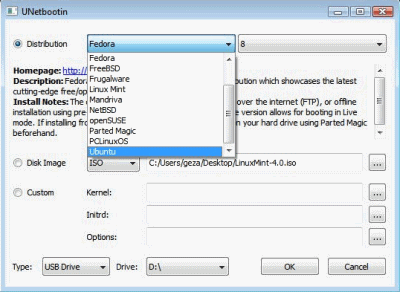
UNetBootin is one of the best and straight-forward software to create bootable USB drives. This free software is small in size, works faster without any error. This free software to make USB bootable can be used for both Linux and Windows. You can create live bootable drives for many Linux distributions. This free software allows you to download several Linux distribution like Fedora, FreeBSD, Ubuntu Linux or you can simply specify an ISO file, and this free software will use it to make USB bootable. Download this software for free.
Read more about UNetBootin or simply try it out here.
Image Writer
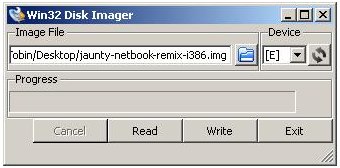
Image Writer is one of the simple and free software to make USB sticks bootable on Windows. If you have an ISO file, this free software writes its image to USB stick. This free software comes with a user-friendly and straight-forward interface which allows you to make USB bootable like a breeze. It’s easy to use, as you just need to select the ISO file, select drive of your USB drive and hit the “Write” button. That’s all you need to do and this software will write that ISO file to your USB drive.
Read more about Image Writer or simply make a try here.
Also, check out free software to view images.
Passcape ISO Burner

Passcape ISO Burner is a free ISO burner which allows you to burn ISO files to USB flash drives, CD and DVD. With the help of this software, you can easily write ISO files to USB flash drives for making USB drives bootable. Even the beginners can easily create bootable discs and bootable USB flash drives because of the easy to understand and simple interface. This free software offers one of the easiest way to make USB bootable. Download Passcape ISO Burner for free.
Read more Passcape ISO Burner or try it out here.
ISO To USB
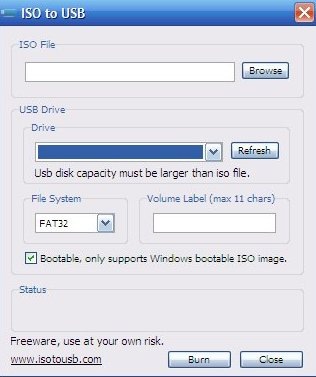
ISO To USB is another free software which allows you to burn ISO files to USB flash drives. ISO to USB is a compact software which takes very less space of your disk and works perfectly. This free software can easily burn your ISO files to any USB drive, making USB drive bootable. The interface is extremely simple and offers straight-forward functionality. Even the non-technical users can easily use this software to make USB bootable. Download ISO to USB for free.
Read more about ISO to USB or try it out here.
