Missed Call Mailer is a free Android app to get missed call alerts on email. Missed Call Mailer app sends you missed call alerts from Android to your email. The app identifies the missed calls on your Android and sends you the caller details on the email which you have registered with the app.
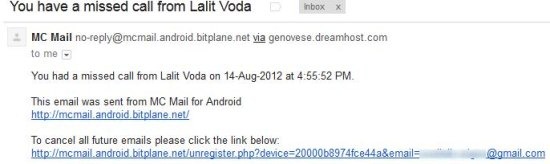
The mail sent by the app contains the caller name, if it is saved in your contact list. In case the caller number is not saved, then the app sends you the caller number along with the exact time of missed call.

To use the app, you just need to register the mail ID, choose the phone mode at which the app should send the missed call email alert and you are all set. Now, the app will start sending the emails of each and every missed call which you missed to receive on your Android phone.
Why Do You Need Missed Call Mailer App:
Sometimes you might be at a place where you might not be allowed to carry your phone. For example, in some hospitals or even offices the phone is not allowed (like, in call centers). In those cases, you can easily get the missed call alert on your email. If you see a missed call from someone important, you can step out for a minute to make a quick call to that person. So, this is quite a useful app for those who are in situations like these often.
How To Set-up And Enable Missed Call Mailer App:
Step 1: Download and install Missed Call Mailer App.
Step 2: Launch the app.
Step 3: Register the email on which you want to receive the missed call alert.
Step 4: Open your email and verify the app registration.
Step 5: Now, choose to ignore withheld numbers or choose whether to send missed call alert on silent mode or not.
Step 6: Finally, on every missed call you will receive missed call alert email from the app.
Features Of Missed Call Mailer App:
- Get missed call alerts on your email.
- Register any of your email address.
- Choose to ignore withheld numbers.
- Choose whether to send missed call alerts on email or not.
- Easy to set up and enable.
Install:
Click here to download and install Missed Call Mailer app from Google Play Store. You can also scan the QR Code below with Barcode Scanner app to install the app.

Install Missed Call Mailer app today on your smart phone get all the missed call alert updates in real-time. This Android app is truly a useful app that makes you aware about the callers calling on your phone which you can’t receive just because you didn’t have your Android phone with you.
You can check beeZee app for Android to auto-reply missed calls and SMS. Also, check out Voicemail Chimp for Android to automatically send SMS when busy.
