JonDoFox is a free internet security software for Firefox that has been designed to enable secure web browsing. This free internet security profile for Firefox is very useful for people looking for software that helps them in anonymous web surfing. It ensures private web browsing and keeps you safe from advertisers and hackers. The software uses multiple servers and a layered encryption that makes it the best in its kind. The free Firefox browser profile works best when it is integrated as a Firefox add-on.

Installing JonDoFox
To install JonDoFox you need to go here. Click on the download button and an .exe file will be downloaded. The .exe file is of around 22MB and takes some time to download. After the download is complete click on the .exe file and the installation process will start. The installation is a bit complex and asks numerous questions. You need to select the appropriate options according to the one suitable to you. It is important that you use a proxy tool or proxy service like Stealthy, Freegate or FoxyProxy Standard to get the best out of JonDoFox.
Interface of JonDoFox
This free Firefox browser profile has a simple and an interactive interface. It will not be easy for new users to use all the functions in the JonDoFox interface. Once you start using all the complex functions you will become comfortable with the interface of the software. The software has a pretty straightforward interface and does not have many menus or options. You can see all the activities in the main screen of the software itself.
Using this free internet security software
This free Firefox browser profile follows a very complex process and you need to follow each function properly to complete the process. Once you install the software you need to configure it with your browser and your system. The anonymizer in the software is known to be the best as compared to other software. It is recommended that you use this with your Mozilla Firefox web browser for using it easily. The software works well to keep your data secured and protect you from third party interference.
You need to configure this free internet security profile for Firefox properly with your web browser security features. The toughest thing is to configure it with your system. You need to make sure that the software is set up properly with your ISP, antivirus software, and browser. While you are setting it up and configuring, the software will assist you explaining each and every step properly.
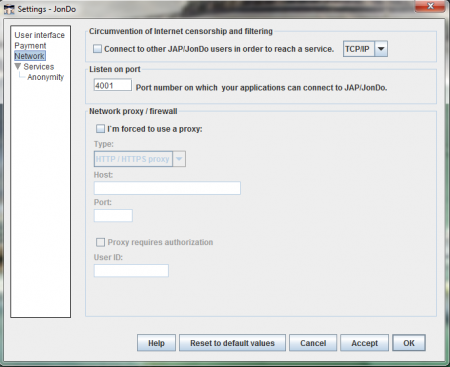
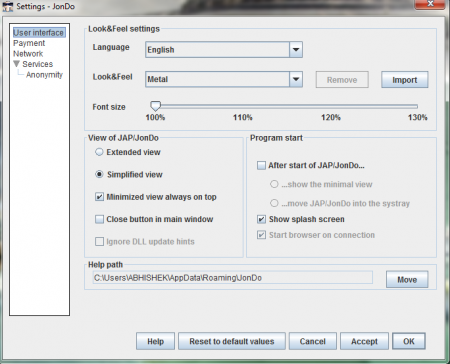
At the top right corner you can find the configure option. Once you click on the configure button a window appears, here you can find options like user interface, payment, and network. By clicking on the user interface option you can make changes on the look of the software. You can change the look and feel to metal, nimbus, windows classic, etc. There is a drop down menu that helps you to make changes in the language. The font size can be increased to 130%.
In the view jap/jondo option you can select the view that you like. Then there is the payment option that enables you to make payment if you are using a free version. In the network section you can select the type of network you have and set it up with your internet connection. There is an option in the main screen where you can put your anonymity on or off. All in all JonDoFox is complex software but good for the protection of your system while you use the internet.
