| Sponsored Links |
RamRush is a free software that optimizes and manages the physical memory of your system. It frees up physical RAM, and makes more RAM available for your programs. This is like getting additional memory without installing additional physical RAM. RamRush optimizes your RAM usage very well. It intelligently monitors and manages your physical RAM, and provide better performance for all your programs. This effectively prevents system crashes, and keeps your system running smoothly.
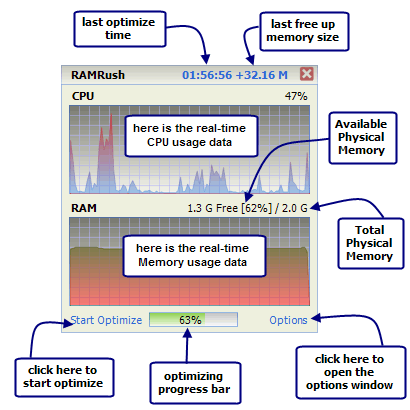
RamRush is very easy to use, and does not requires any skills at your end. When you install RamRush, it keeps sitting in your system tray, and you can choose to optimize your memory usage by just 1-click. RamRush can show you real time CPU usage data, real time memory usage data, total physical memory, and available physical memory. All this information is displayed in easy to read graphical format.
Here are some features of this free memory optimization software:
- RamRush can increase system performance, and increase the amount of available memory.
- RamRush has a good feature that can defragment system physical memory. This is akin to Defragmenting your hard disk.
- RamRush monitors windows applications, and recovers memory from those that do not need it any more.
RamRush removes memory leaks. - It prevents system crashes and system freezes that are caused by memory problems.
- Memory can be optimized by just hitting a Hotkey
- RAMRush has AutoOptimize mode support that takes care of configuration itself.
- Supports Command line mode (eg: ‘PATHOFRAMRUSH/RAMRush.exe -AutoOptimize’)
- Completely Free.
Here is a small video tutorial that explains how to download, install, and use RamRush.
RamRush is a neat software that works very effectively. It is completely free. Apart from optimizing memory, you should also keep other parts of your system tuned, like registry, startup etc. System utilities suites like Glary Utilities, and TweakNow come very handy for that.
If you are one of those who do not believe such memory optimization programs work (read the long debate below), your other option would be to add additional memory to your computer.
Home Page: Click Here Download (Free): Click Here Works With: Windows Free / Paid: Free |
Be the first to know about Latest Free Software |


Does. Not. Work.
Seriously. It was said numerous times by people who have a clue about Windows (Sysinternals comes to mind) that best way to “optimize” memory under Windows is to let Windows manage itself.
There is no magical way to get more free memory out of nowhere. Either you move things that don’t matter and make no difference or you hit things that are needed and shoot performance, instead of improving it.
@Rarst: Interesting comment. One thing we need to remember is that Windows manages memory best based on the type of coding that is done in the programs that are running. Both of us know that many programs do a pretty bad job at that, and Windows is essentially left to their mercy. This is where RamRush comes handy. Apart from that, it also defragments the memory, which has same advantages as a defragmented hard disk.
In fact, if you head over to MSDN here, you will see that Microsoft has described functions in details that can be used to manage memory, and I am sure RamRush is leveraging those. There won’t have been a need for Microsoft to expose those if it didn’t feel a need for outside help in that regards.
And I really wish Windows was good at handling all such things itself. Then there won’t have been a need for registry cleaners, drive defragmenters, and all other System utilities.
Windows is good at lot of things, but does needs a helping hand sometimes.
Memory defragmentation makes no sense either. Drive defrag makes sense because of substantial difference between sequential read and random read. Heads have to physically move around. There is no such factor in memory.
Drive defragmentation can be practically benchmarked and I read such studies. I hadn’t read or even seen mentions of a single study that was able to benchmark performance gain from memory optimization.
Windows indeed requires maintenance, but memory optimizers merely abuse that fact.
oh man.. I can’t tell how much do I enjoy these discussions. These are both fun, as well as enlightening.
Here is something that I grabbed from net, that pretty well explains how memory optimization works:
This is exactly what I use such memory optimization programs for – do get rid of the hangover effect after I had been running some heavy application.
Regarding Defrag, I am going to agree with you in principle, with a small caveat. All my readings around this indicate that Windows automatically takes care of Defragging RAM whenever it reboots. So, it is not required on the computers that are regularly rebooted, but if some system is running for quite some time, this manual defragmentation can be helpful.
Waiting to be enlightened further.
Yes, optimizer software or even such simple script will free some memory. But so will Windows! Difference is Windows knows better what and when to claim, while third party app will just try to kick whatever it sees.
It plays on the fact that more free memory is perceived as a good thing. When real good think is enough memory to fit everything. If you have enough memory you have no need for manual cleanups, if you don’t – you have a problem cleanup won’t really solve.
>Windows automatically takes care of Defragging RAM whenever it reboots
Memory is simply reset on reboot and filled from scratch when Windows loads. :) It is as much of defragmentation as drive format.
Honestly we are so used to reboots as first answer to everything, but in reality Windows had long become too stable for that too matter much. I can run my home desktops for months easily without any reboots. Of course selection of software matters, but that’s not Windows fault.
Interesting.. you said free memory is perceived as a good thing. Isn’t it indeed good? Instead of just adding additional memory in the PC, how about better managing the existing one.
>Isn’t it indeed good?
What is better 1GB of free memory or 2GB? 2GB or 4GB? Why? :) Truth is on modern PC you are unlikely to run out of memory unless running very hungry (or crappy software). Spending extra effort on kicking data out of memory to have more free memory is meaningless.
It is like throwing people out of the bus so that bus is comfortably empty. Looks nice but defeats the purpose of the bus.
>how about better managing the existing one.
And why exactly we assume it’s badly managed? I think Windows is better at managing memory than 3rd party apps that can’t offer meaningful benchmark to proof their worth. We do not run third party apps to “help” Windows manage file system or processor. Why memory?
Buddy, I am going to fundamentally disagree with you at this point. You seem to be advocating installing tons of memory, and I am completely against that. Your comparison of memory management with processor management is comparing apples to oranges.
As usual, we will have to agree to disagree :)
I am advocating installing enough memory for tasks performed. For some this would be 512MB, for some 4GB… Myself I am fine with 2GB.
Or from other end – using software with resource requirements adequate to hardware available.
Overall my point is – memory is hardware resource and over years I learned that no amount of software tweaking can make up for lacking hardware. :)