Here is a step by step tutorial to zoom webpages and other files on Android. When I was a new Android user, I didn’t know how to zoom a webpage and other files on my Android phone.
Then I searched and found ways to zoom webpages and other files like image file, document file, or any other file. I thought of listing down the steps here if you are also a newbie to the Android world. Experienced users might not find any additional useful information here, but you might want to find how to increase font size on Android.
Steps To Zoom Webpages And Other Files On Android Phone:
Step 1: Open any web page on your Android browser.
Step 2: Now double tap on the webpage to zoom it on Android. The webpage will be zoomed to a standard level.
Step 3: If you want to zoom the webpage even more, then pinch on the webpage to zoom in more. You can zoom the webpage as much as you want by pinching it more and more.
To zoom out the webpages, you need to follow same steps. Double tap on the webpage or pinch out on the webpage to zoom out. You can follow the same process for zoom in and zoom out other files which includes images, document files, and the like on your Android phone.
Users With Sony Ericsson Android Phone Have To Follow Below Steps To Use The Zoom Feature On Their Android:
Step 1: Open any website on your Android browser. Open the website from which you want to zoom the contents on your Sony Ericsson Android screen.
Step 2: Now double tap on the webpage to zoom in and zoom out the webpage on your Sony Ericsson Android phone.
Step 3: As soon as you double tap on the webpage on your Sony Ericsson Android phone, you will get a minus and plus button on your Android screen.
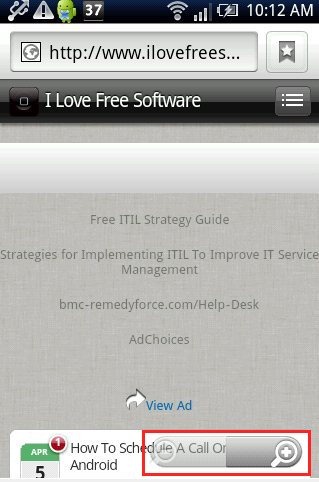
Step 4: Tap on the plus button to zoom in the webpage and tap on the minus button to zoom out the web page.
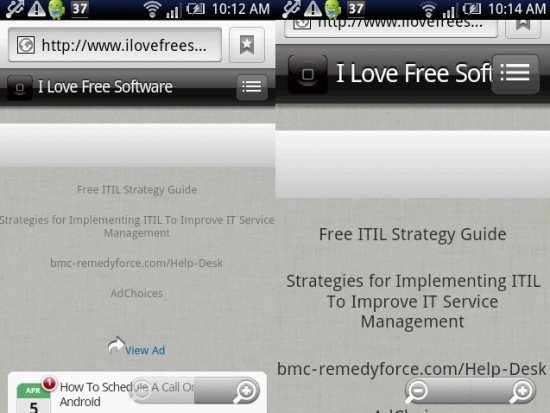
To zoom in and zoom out other files like image like, open the image and then long press the image file. You will find plus button to zoom in and minus button to zoom out the image on your Sony Ericsson Android phone.
Also, check out how to install non-market apps on Android.
