Task Unifier is a freeware task manager that allows you to manage the various tasks you must perform in your daily life. This small, but useful, task manager is built on the ‘Get Things Done’ principle as it aids you with the management of your tasks, folder, contexts, goals, locations and so forth.
This free task manager is compatible with all computer platforms that have Java software installed.
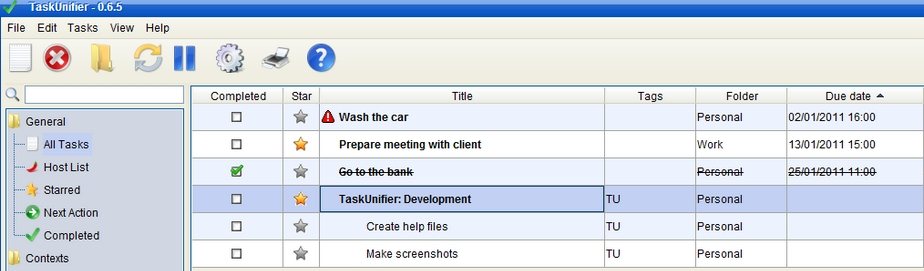
Using Task Unifier you are able to perform different functions that will help you finish, as mentioned above, all those daily or weekly chores.
Some other free task managers we reviewed earlier include: online task manager, To do manager, and Task List Guru.
Here are some of the features of this task manager freeware:
Synchronize: This option allows you to get your tasks in some sort of order. Simply click on the ‘Settings’ icon then on the ‘Toodledo’ button and follow the simple directions. Instantly all your tasks will be synchronized.
Folders: In this section you are able to arrange your tasks into folders. Within each folder you create, you are able to add information pertaining to any particular task. Opening the folder page is only a matter of clicking on the folders button and, once again, following the simple instructions.
Contexts: Within the ‘Context’s’ you are able to arrange tasks depending on chore context. For example, if your task is mowing the front lawn, you may open a “gardening” context. You’ll find the ‘Contexts’ button on the left of the main interface.
Goals: This particular option helps you achieve the goals you’ve set yourself. Using this option would encourage you finish any and all tasks. It basically stops you from becoming a procrastinator.
Locations: This useful feature allows you to organize your tasks depending on your current location. This option is ideal for people who travel often and are not tied to one location.
Subtasks: Use this option to divide your chores into smaller categories, or ‘subtasks’. This will prevent you missing or skipping a particular job within a task.
Tags: Each of your tasks can be given one or more tags. If, you are one of these people that has a great deal to do everyday or week, tagging each task certainly makes sense.
Themes: You are able to change the theme of Task Unifier simply by choosing from one of the many themes this free software provides. If you’re the kind of person that enjoys variety; choose a theme and jazz up the program.
Languages: Free Task Unifier is available in English and French. It is hoped in the near future other languages will be added to the program.
Proxy: Task Unifier runs perfectly well behind any proxy and will not affect the operations of any other programs running at the same time on your computer.
The above features of this simple to use free task manager will most definitely allow you keep on top of your daily duties. Download Task Unifier now here, and get things done.
