• Home
  • Software Testing Service
  • About US
    • Privacy Policy
    • Disclosure
  • Write For Us
  • Submit Software
  • Contact Us
    • Subscribe
I Love Free Software
Best free software available all over the web. The free software categories include Windows Software, Social Networking Tools, and software installation videos.


  • Featured
  • Windows
  • Web Applications
  • App Store
  • Android
  • iPhone
  • iPad
  • Windows 8
  • Social Networking
  • Programming Tools

Peepel Web Writer: Create and Collaborate on Documents Online

By Ishan Bansal on October 11, 2009 | Sponsored Links

te with Web Sheet (replacement for Excel), Web Writer (replacement for Word), contact manager, file manager, and a lot more. All this for Free!
I won’t be doing a justice to Peepel if I review the entire suite in just one post. So, I decide to split this across a few posts. Today I will review the Web Writer component of Peepel, and I will review the remaining components over next few days (subscribe to our RSS feed to come to know when next articles are published).
Peepel WebWriter is a free online replacement for Microsoft Word. It is a full featured document editing program, and comes with nice collaboration features. The first thing that I really liked about Peepel WebWriter is its beautiful interface. The menu is in form of ribbon, and different function sets are arranged in form of tabs. The document window itself is pretty nice, and can be moved around and resized.
Peepel WebWriter has arranged the features in following tabs:
Formatting
Insert
Sharing
Templates
Let me explain all of these.
Formatting:
This is the tab where all the formatting options are present. Peepel WebWriter provides some really good formatting features.

Font: You can change font, font size, Bold, Italic, Underline, Subscript, Superscript, Strikethrough.
Clipboard: You can cut/copy/paste.
Alignment: You can align text to left, right, center, or justify. You can also change indentation, and create both bulleted as well as numbered lists.
As you would notice from above, all the commonly used formatting options are presnt to dress up your document.
Insert:
This tab helps in inserting special stuff in your documents.
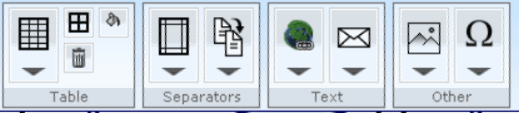
Table: You can insert a table with desired number of rows and columns. You can also modify border color and border width of table.
Separators: You can insert custom sized margins and separators in your document.
Insert Image: You can also insert an image in your document. However, Peepel WebWriter can only insert image from a URL. I was not able to find an option to upload image from my PC.
Apart from these, you can also insert hyperlink, and special characters in your document.
Sharing:
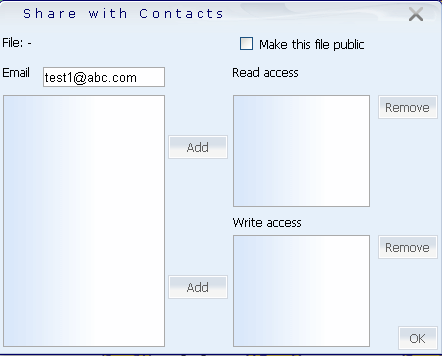
This is one of my favorite features of Peepel WebWriter. You can choose to make your document not available publicly. After that, wou can setup some users with just read access, and others with write access to your document. Then only your chosen users can read and write to the document that you created. Peepel WebWriter also provides a unique URL for each document, that you can directly paste in brower to directly go to your document.
Templates:
You can select pre-defined templates from Peepel WebWriter. Currently available templates are Resume, Letters, and Business Cards.
Once you have created a document in Peepel WebWriter, there are multiple things that you can do with it:
You can save the document online. For this, you can create a free Peepel account. Peepel WebWriter lets you manage your documents by storing in different online folders. You can access the document anytime by logging into your account. Apart from this, you can also download your document to your computer. Peepel WebWriter lets you download document in Microsoft Word format, or Open Office Format. You can also directly print your document from Peepel WebWriter.
Peepel WebWriter is really good, very well designed, and very easy to use. Stay tuned for review of other components of Peepel.

Peepel is a full featured online Office suite. It comes complete with Web Sheet (replacement for Excel), Web Writer (replacement for Word), contact manager, file manager, and a lot more. All this for Free!

I won’t be doing a justice to Peepel if I review the entire suite in just one post. So, I decide to split this across a few posts. Today I will review the Web Writer component of Peepel, and I will review the remaining components over next few days (subscribe to our RSS feed to come to know when next articles are published).

Peepel WebWriter - Online Office Suite
Sponsored Links

Peepel WebWriter is a free online replacement for Microsoft Word. It is a full featured document editing program, and comes with nice collaboration features. The first thing that I really liked about Peepel WebWriter is its beautiful interface. The menu is in form of ribbon, and different function sets are arranged in form of tabs. The document window itself is pretty nice, and can be moved around and resized.

Peepel WebWriter has arranged the features in following tabs:

  • Formatting
  • Insert
  • Sharing
  • Templates

Let me explain all of these.

Formatting:

This is the tab where all the formatting options are present. Peepel WebWriter provides some really good formatting features.

Formatting Options in Peepel WebWriter

Font: You can change font, font size, Bold, Italic, Underline, Subscript, Superscript, Strikethrough.

Clipboard: You can cut/copy/paste.

Alignment: You can align text to left, right, center, or justify. You can also change indentation, and create both bulleted as well as numbered lists.

As you would notice from above, all the commonly used formatting options are presnt to dress up your document.

Insert:

This tab helps in inserting special stuff in your documents.

Insert Options in Peepel WebWriter

Table: You can insert a table with desired number of rows and columns. You can also modify border color and border width of table.

Separators: You can insert custom sized margins and separators in your document.

Insert Image: You can also insert an image in your document. However, Peepel WebWriter can only insert image from a URL. I was not able to find an option to upload image from my PC.

Apart from these, you can also insert hyperlink, and special characters in your document.

Sharing:

Peepel WebWriter Collaboration Options

This is one of my favorite features of Peepel WebWriter. You can choose to make your document not available publicly. After that, you can setup some users with just read access, and others with write access to your document. Then only your chosen users can read and write to the document that you created. Peepel WebWriter also provides a unique URL for each document, that you can directly paste in brower to directly go to your document.

Templates:

You can select pre-defined templates from Peepel WebWriter. Currently available templates are Resume, Letters, and Business Cards.

Once you have created a document in Peepel WebWriter, there are multiple things that you can do with it:

You can save the document online. For this, you can create a free Peepel account. Peepel WebWriter lets you manage your documents by storing in different online folders. You can access the document anytime by logging into your account. Apart from this, you can also download your document to your computer. Peepel WebWriter lets you download document in Microsoft Word format, or Open Office Format. You can also directly print your document from Peepel WebWriter.

Peepel WebWriter is really good, very well designed, and very easy to use. Stay tuned for review of other components of Peepel.

Home Page: Click Here
Free / Paid: Free

Link to This Page:


You Might Also Like:

  1. EtherPad: Collaborate in Real Time on Word Documents
  2. Crocodoc – Share, Review, Collaborate on Documents Online
  3. 4 Free Services to Collaborate in Real Time on Word Documents Online
  4. Acrobat.com: Free Online Office Suite to Create and Share Documents Online
  5. Writeboard: Create Documents Online and Compare Versions

Be the first to know about Latest Free Software:

  • Join us on Facebook
  • Subscribe to our RSS Feed
  • Follow us on Twitter
  • Subscribe to Email Updates:

Posted in Office Suites, Web Applications, Windows | Tagged create documents online, document collaboration, online word processor, peepel, peepel webwriter, webwriter | 3 Responses

Ishan Bansal

  • larry heard

    It would be nice if they could also integrate an online resume support on this.

    • admin

      @Larry – They do provide an online template for resume, if that’s what you are talking about.

  • Pingback: EtherPad: Collaborate in Real Time on Word Documents | I Love Free Software

« Previous Next »

Featured Posts

  • 5 Free Snippet Managers To Manage Code Snippets
  • 5 Free Online Tools To Test Website In Different Resolutions
  • 5 Free Microsoft Access Alternatives
  • 5 Free IP Notifier Apps
  • 5 Online Mapping Websites
  • 5 Free Alternatives To iGoogle
  • 7 Websites To Download Windows 8 Themes
  • 5 Best Free Calculator Apps For Windows 8

Join More than 15,000 Followers!

Enter your Email Address
  • Submit Software
  • Software Testing Service
  • Write For Us
  • About Us
  • Privacy Policy
  • Disclosure
  • Contact Us

Link to Us:

Did we review your software here? Feel free to flaunt this badge on your website:

Free Software

Use this Code:

Copyright © 2013 I Love Free Software.

Powered by WordPress and Hybrid. New - H