Mougg is a free cloud music library that allows you to store music online. This free cloud music storage lets you store up to 1 GB of music online. This cloud music streaming service lets you to listen to your favorite songs on any computer that has an Internet connection.
Gone are the days of having copy your music files to a USB stick and carrying it over to a friend’s place to listen; simply signing up on Mougg and your music “follows” you. This is the ideal cloud music library and its popularity is continuing to grow. You are also able to listen to this cloud music service on your Android Smartphone and it is hoped that soon iPhone and Blackberry will also allow this service.
All that is required is to click on the “green” sign up button and enter your name, email address and a password. Mougg appears to operate exactly like iTunes with a built-in music player displayed at the top of the screen.
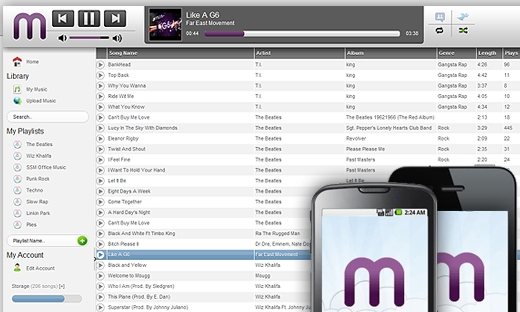
Once you have signed up, the next step is to upload your favorite tunes.
Uploading is easy; simply click on the ‘Upload Music’ link in the ‘library’ button and within a few seconds,you’ll have your cloud music storage. A small black window will open at the bottom of the screen; clicking browse will open your music files and they will begin to upload. A list of your music will be displayed beneath the browse button. You are able to play all your music simply by clicking on the ‘My Music” button.
To create a playlist for this streaming cloud music application, click on the ‘Playlist Name’ and follow the instructions. Once complete, click on the green plus sign and your new playlist will be added to the menu. When you wish to add songs, simply drag and drop them in the ‘My Music’ menu to the playlist name.
Once you understand how to use this music cloud application, you can access your music from any computer; simply by visiting the Mougg home page and entering your password and name. Android users are able to find the Mougg application in the marketplace.
Some other similar applications we reviewed earlier are: MP3Tunes, PSonar, Moof, and AudioBox.fm.
Mougg has received, and is still receiving, positive reviews with magazines, like Rolling Stone, giving this free application two thumbs up. Without a doubt having a mobile music library is what more and more people are going to be searching for and it is clear the creators of Mougg are ahead of their time. Indeed cloud music libraries, cloud music services and cloud music storage will be the norm in the very near future. Try Mougg free here.
