JayCut is free online video editor. Generally free video editing software are costly and require special hardware and software, but JayCut has introduced free online video editing. It is easy to upload videos to JayCut and avail its editing technical features to make your videos just effective and attractive. JayCut serves 2GB free storage space and you can save and export up to 20 videos per month. The best thing about this free online video editor is you don’t need to install or download any software.
JayCut offers most of the basic video editing features making editing easy for you.
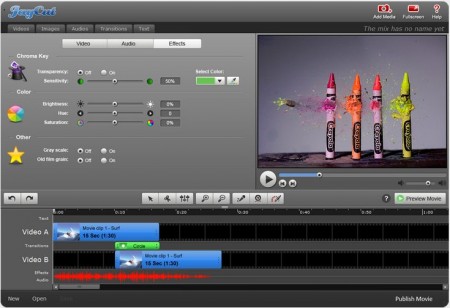
Here are some of the features of this free online video editor:
- Remix and trim your videos with JayCut
- Add transitions and music effects in your videos from wide library of JayCut
- Add captions and subtitles
- Exports to other web sites like YouTube
- Export videos to your iPhone, Mac and Windows
JayCut serves with variety of transition and visual effects to make your video attractive. Very new features added in the applications are slow motion effects and green screen compatibility and other colorization techniques.
Some other free video editing software that we reviewed earlier include: Avidemux video editor, VideoSpin, and VirtualDub.
What can you do with JayCut in the nutshell:
- You insert your video with the timeline
- Trim extra frames from your video which are not essential
- You can also add audio format for background music. Synchronize your frames according to the music in desired order with its editor.
- Preview your video in its original and edited form.
- Add textual titles in your video frames to make it more communicative.
- Export created videos directly to YouTube or save it with JayCut which enables you to edit it further for future use.
The application interface is very interesting and beautiful. It has multiple tabs for videos, images and audio. With its user friendly interface you can easily mix videos and create animations, insert effects that will enhance your videos.
Since installation is not required, JayCut offers great portability. You can access to your online video editor anywhere in the world without worry about hardware and software issues. Just create effective videos for yourselves and preview them on the same screen. In nutshell, JayCut is powerful online video editor and that too absolutely free!
