XWindows Dock is an attractive, free application launcher which gives a new look to your Screen. It’s a launcher where you can have your favorite folders, programs and other files which you might want to access with just a click and not search within the folders.
The launcher also works as a free desktop organizer and can be placed anywhere on your desktop and you can add your favorite programs and files by just dragging them to the launcher panel.
Installing XWindows Dock
In order to download and install this launcher on your computer you need to follow the following steps:
- Visit the developer’s website and click on the Download link. After you click on download the download starts which takes a couple of minutes to be downloaded on your system.
- The next step is to run the setup file which gets downloaded whereby you would be required to select the folders and a few more options in the step by step process.
- You are ready to use the application where you would notice the launcher at the bottom of your screen as and when the setup process completes.
People interested to try some more app launcher can check out Launchy, Circle Dock and MadAppLauncher
Using XWindows Dock
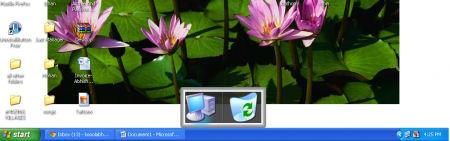
The software is pretty simple to use where you need not do much to customize it and have the direct link to your favorite applications. As seen in the screenshot below the launcher is present on your desktop with Recycle Bin and My Computer as the default icons in the launcher.
For example if you are a user who uses the MS Word application on a regular basis then dragging the MS Word application to the launcher is what you need to do to get an instant access through your desktop.
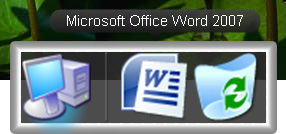
You may add as many apps which fits the window and make your launcher give a great feel to your computer. It would not only help you reduce time but also make sure you don’t need to search for the applications which you use on a regular basis or the ones which are important and you may need them anytime.
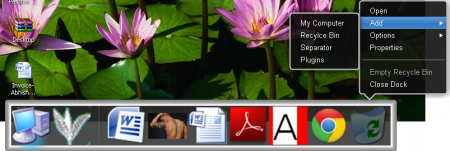
In order to have a look at the several options the launcher comes with, you need to right click in a blank area which would popup the options which the launcher comes with. As seen in the screenshot below you would see that there are options to open applications, add some default applications check out the options and properties to customize and more. In order to set the way you wish to see the launcher you need to click on the preferences which would popup a new window with several options on it.
This new window comes with three main options which are:
- General
- Skins
- Plugins
In the general tab you have the option to check and uncheck for changing the look and presence of the launcher on your screen. For example you may change the radio button to 3D to have a 3D look to the launcher. There are of course much more to change and set the way this software runs from here.
In the skins you have the option to change the theme or the base of your launcher. And the plugins window presents you with the option to use default plugins such as the Container which would bring out a small explorer window to your launch bar. You just need to drag it from the plugins window to the launcher and it would start functioning.

Now that you know all about XWindows Dock, you can use this free application launcher to give a new look to your desktop, and make launching programs easy.
