• Home
  • Software Testing Service
  • About US
    • Privacy Policy
    • Disclosure
  • Write For Us
  • Submit Software
  • Contact Us
    • Subscribe
I Love Free Software
Best free software available all over the web. The free software categories include Windows Software, Social Networking Tools, and software installation videos.


  • Featured
  • Windows
  • Web Applications
  • App Store
  • Android
  • iPhone
  • iPad
  • Windows 8
  • Social Networking
  • Programming Tools

How To Enable Status Bar In Full Screen Mode On Android

By Lalit Aggarwal on April 9, 2012 | Sponsored Links

Here is a step by step tutorial to enable status bar in full screen mode on Android phone. We normally are not able to access status bar while our Android is on full screen mode. For e.g., while watching a video on Android we can’t access status bar on our Android phone. If you want to check the time in between watching a video, then you need to stop the video and then drag the status bar to check the time. This seems to be a disturbing process while your Android is in full screen mode.

Sometimes it happens that you got a important message and you are doing a very important task in full screen mode on your Android. You can’t stop or switch back from the task you are performing on your Android phone. In these types of cases you feel helpless and end up working on one task and ignoring the other. To deal with problems like these, below are the steps to enable status bar in full screen mode on Android phone.

Steps To Enable Status Bar In Full Screen Mode On Android Phone:

Step 1: Login to Google Play Store or Android Market.

Step 2: Search for “Smart Statusbar” app in Google Play Store.

Smart Statusbar
Sponsored Links

Step 3: Install “Smart Statusbar” app on your Android phone.

Step 4: Launch the app and customize the status bar option according to your requirements.
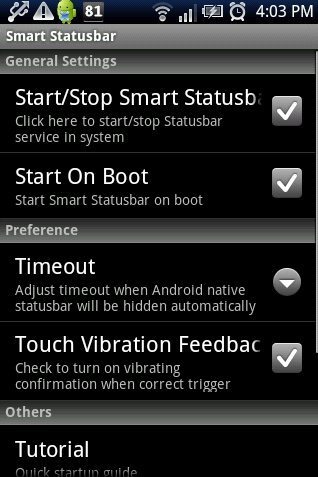
Smart Statusbar App

Step 5: Switch your Android phone to full screen mode or on video mode.

Step 6: Now drag the status bar as you normally drag it. You can access the status bar in full screen mode on your Android phone.

Smart Statusbar App Full Screen Mode

Just install this smart status bar app on your Android phone and work smartly on your Android. Make your work easier and faster with the app installed on your Android phone. Do multi tasking and make your smart phone smarter.

Also, check out how to hide status bar on Android reviewed by us.

Home Page: Click Here
Works With: Android 2.0 and up
Free / Paid: Free

Link to This Page:


You Might Also Like:

  1. Access Status Bar In Full-Screen Mode: Bird Bar Notifications Tool App
  2. How To Keep Screen ON Of Android Phone
  3. Full Screen Caller ID LITE App For Android
  4. How To Automatically Set Android Phone On Silent Mode While At Work
  5. How To Enable Pattern Lock With Go Locker App On Android

Be the first to know about Latest Free Software:

  • Join us on Facebook
  • Subscribe to our RSS Feed
  • Follow us on Twitter
  • Subscribe to Email Updates:

Posted in Android | Tagged android | Leave a response

Lalit Aggarwal

« Previous Next »

Featured Posts

  • 5 Free Snippet Managers To Manage Code Snippets
  • 5 Free Online Tools To Test Website In Different Resolutions
  • 5 Free Microsoft Access Alternatives
  • 5 Free IP Notifier Apps
  • 5 Online Mapping Websites
  • 5 Free Alternatives To iGoogle
  • 7 Websites To Download Windows 8 Themes
  • 5 Best Free Calculator Apps For Windows 8

Join More than 15,000 Followers!

Enter your Email Address
  • Submit Software
  • Software Testing Service
  • Write For Us
  • About Us
  • Privacy Policy
  • Disclosure
  • Contact Us

Link to Us:

Did we review your software here? Feel free to flaunt this badge on your website:

Free Software

Use this Code:

Copyright © 2013 I Love Free Software.

Powered by WordPress and Hybrid. New - H