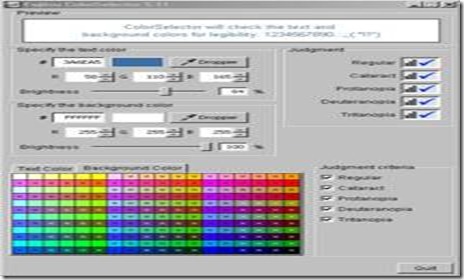
Color Selector from Fujitsu is a free color selecting software wherein you can select background and text color effortlessly. Using, this free color selector, graphic designers and the image editors get the option of selecting the proper blend of color. Users even adjust various settings including the RGB profile in order to make the desired color. Color Selector from Fujitsu will soon be available in Chinese and Korean languages. Below I am going to discuss some of the important features which make this very useful.

Features available in Color Selector from Fujitsu:
The required amounts of processing time and memory resources used are very low and thus are very light on the system. Therefore many people and organizations are selecting the Color Selector from Fujitsu, which has now become even more advanced with the additional color options to choose from. In order to compete with similar other software in the competent IT and graphics industry. It even has a judgment system based on the 5 factors like Regular, Cataract, Protanopia etc.
Using the Dropper tool, you can select any color available on the display. As discussed above, you can even enter or specify the RGB values of any color and further judge it’s legibility. It even allows you to check or examine the specified combination of text and background colors. Color Selector Works on Windows as well as on Mac OS X.
Also, check out Absolute Color Picker reviewed by us.
Download And Installation Of Color Selector:
- For downloading and installing Color Selector from Fujitsu you can visit the Fujitsu site and directly download the zip compressed file of this software. After downloading it you need to extract the installer and just follow the steps as given. But always keep in mind that this software is presently available for Windows and Mac users only. The recent version of this software is version 5.1.
- For using the Color Selector from Fujitsu as a Mac user you need to double click Color Selector for English version 5.1 in the folder named folder Fujitsu Color Selector for English. The Windows users on the other hand need to double click Colourselector_en.exe present within the Fujitsu Color Selector for English extracted folder.
- After the software window opens you need to select the dropper tool and use it in order to select a particular color, and then adjust based on the needs of the designer or editor.
You would also like to check out Peacock color picker reviewed by us.
Conclusion:
The Color Selector from Fujitsu is one of the most advanced color selection tools available. With various factors related to the judgment of the color selection, this tool is most often used by the advanced graphic designers of the modern days in order to ensure that the color selection remains proper. With each and every steeping stone in form of updated versions new features are being integrated along with it. Click here to try Color Selector.
