• Home
  • Software Testing Service
  • About US
    • Privacy Policy
    • Disclosure
  • Write For Us
  • Submit Software
  • Contact Us
    • Subscribe
I Love Free Software
Best free software available all over the web. The free software categories include Windows Software, Social Networking Tools, and software installation videos.


  • Featured
  • Windows
  • Web Applications
  • App Store
  • Android
  • iPhone
  • iPad
  • Windows 8
  • Social Networking
  • Programming Tools

Chrome Extension to Receive Facebook Chat Notification on Browser

By Kritika Sota on August 8, 2012 | Sponsored Links

Facebook chat notification is a great Chrome extension which displays a pop-up as soon as somebody sends a chat message on Facebook. This works fine if you are away from your browser and thus lets you know as soon as someone pings you.

Installing Facebook chat notification extension

Before installing the Facebook chat notification extension, you need to install the Google Chrome browser. If you already have the browser installed, simply follow the given steps:

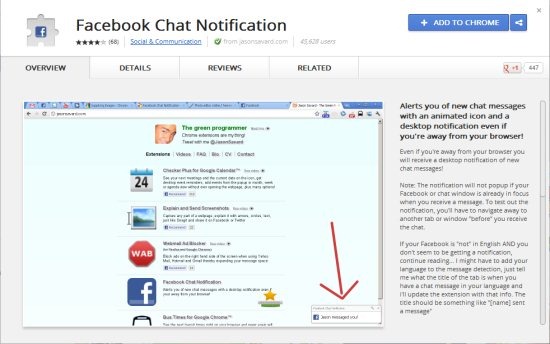
  • Open the chrome webstore on your Chrome browser.
fb1
Sponsored Links

  • As you can see in the above snapshot, you need to click on ‘Add to chrome’.
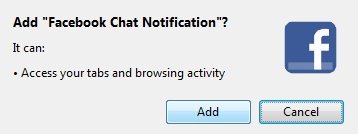
  • The following dialog box appears after the previous step. You need to click on ‘add’.
fb2

The installation process is complete and you can begin using your new Facebook chat notification extension. Once this extension is installed on your browser, you will see an impressive animated icon present on the browser.

fb6

Chat notifications

Now let us see how Facebook chat notification works:

  • Simply click on the Facebook chat notification extension on your browser.
  • This will open the Facebook website where you will enter your credentials to open the Facebook homepage.
  • To test this extension, you will have to open some other tab or window. This is because it won’t display pop-ups if your Facebook homepage is already opened.
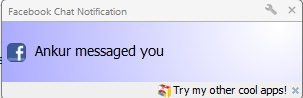
  • If someone sends you a chat message on Facebook, you can see a popup on your screen.
fb3

  • The Facebook chat notification icon on the top is also changed as you can see in the snapshot below:

fb5

Thus, using this Facebook chat notification extension is simple. You can even change the settings to change the location of the pop-up.

Verdict

Overall, Facebook chat notification is impressive as you need not keep your Facebook homepage opened for chat notifications. You can work and chat simultaneously with this. So why not give it a try!

Home Page: Click Here
Works With: Chrome
Free / Paid: Free

Link to This Page:


You Might Also Like:

  1. Block Facebook Chat Message Seen Notification: Chat Undetected
  2. Change Facebook Chat Window Look: Facebook Chat Layout
  3. FBChatSeenBlocker To Remove Facebook Chat “Seen” Notification
  4. Receive Gmail Account Notifications with Checker Plus Chrome Extension
  5. Free Extension To Partially Block Facebook On Chrome

Be the first to know about Latest Free Software:

  • Join us on Facebook
  • Subscribe to our RSS Feed
  • Follow us on Twitter
  • Subscribe to Email Updates:

Posted in Plugins | Tagged chrome extension | Leave a response

Kritika Sota

« Previous Next »

Featured Posts

  • 5 Free Snippet Managers To Manage Code Snippets
  • 5 Free Online Tools To Test Website In Different Resolutions
  • 5 Free Microsoft Access Alternatives
  • 5 Free IP Notifier Apps
  • 5 Online Mapping Websites
  • 5 Free Alternatives To iGoogle
  • 7 Websites To Download Windows 8 Themes
  • 5 Best Free Calculator Apps For Windows 8

Join More than 15,000 Followers!

Enter your Email Address
  • Submit Software
  • Software Testing Service
  • Write For Us
  • About Us
  • Privacy Policy
  • Disclosure
  • Contact Us

Link to Us:

Did we review your software here? Feel free to flaunt this badge on your website:

Free Software

Use this Code:

Copyright © 2013 I Love Free Software.

Powered by WordPress and Hybrid. New - H