• Home
  • Software Testing Service
  • About US
    • Privacy Policy
    • Disclosure
  • Write For Us
  • Submit Software
  • Contact Us
    • Subscribe
I Love Free Software
Best free software available all over the web. The free software categories include Windows Software, Social Networking Tools, and software installation videos.


  • Featured
  • Windows
  • Web Applications
  • App Store
  • Android
  • iPhone
  • iPad
  • Windows 8
  • Social Networking
  • Programming Tools

Free Android File Manager: IO File Manager

By Lalit Aggarwal on November 8, 2011 | Sponsored Links

IO File Manager is a free Android file manager that manages files on SD card of Android system. You can now have access to each and every file of your SD card. Just manage your pictures, videos, songs, any text file in the specific folders and give each folders their name. Make your data as easy as you want in an organized way via Android File Manager.
IO
Sponsored Links

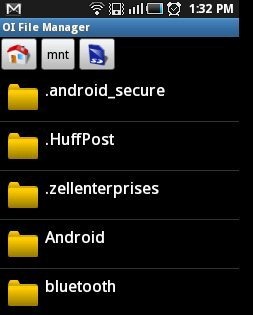
With OI File Manager for Android, you can open and mange SD card, rename, create directories, move and much more. Also get rid of connecting your Android phones via USB cable to computers for  managing your SD card and performing the function like renaming, copying, moving, and deleting the files. These authorities are now in your Android phone with this great Android file manager. Lets take a look on how IO File Manager explores the contents of SD card:
OI2

You can also check another file manager for Android reviewed by us.

Some Key Features Of IO Android File Manager:

  • It explores your SD card content directly on your Android System.
  • You can manage contents of SD card like create directories, rename, copy, move, send and delete files.

OI3

  • Thumbnail mode shows the list of files for displaying images.
  • You can use this app as extension for the application like Gmail to attach a file from SD card.

There are more features but these were some of the basic ones. You can also check file manager for your iPhone, iPad and iPod reviewed by us.

How To Install IO File Manager:

  • Just login to “Android Market”.
  • Click on “Search”. Type “IO File Manager” in search tab.
  • Click on “IO File Manager”.
  • Click on “Install”.

The Free IO File Manager will be automatically installed. Now just have this great Android file manager installed and manage your data in such a way, so that it becomes easier for you to access any file in just one tap.

Home Page: Click Here
Works With: Android 1.1 or later
Free / Paid: Free

Link to This Page:


You Might Also Like:

  1. File Manager App To Access SD Card On Android
  2. Free Android File Manager: ASTRO File Manager
  3. 5 Free File Manager Apps for Android
  4. ES File Explorer App To Access SD Card On Android
  5. Android Download Manager: Manage Downloads On Android With IDM

Be the first to know about Latest Free Software:

  • Join us on Facebook
  • Subscribe to our RSS Feed
  • Follow us on Twitter
  • Subscribe to Email Updates:

Posted in Android | Tagged android, file manager | Leave a response

Lalit Aggarwal

« Previous Next »

Featured Posts

  • Top 7 Free Launchers for Android
  • 5 Free Snippet Managers To Manage Code Snippets
  • 5 Free Online Tools To Test Website In Different Resolutions
  • 5 Free Microsoft Access Alternatives
  • 5 Free IP Notifier Apps
  • 5 Online Mapping Websites
  • 5 Free Alternatives To iGoogle
  • 7 Websites To Download Windows 8 Themes

Join More than 15,000 Followers!

Enter your Email Address
  • Submit Software
  • Software Testing Service
  • Write For Us
  • About Us
  • Privacy Policy
  • Disclosure
  • Contact Us

Link to Us:

Did we review your software here? Feel free to flaunt this badge on your website:

Free Software

Use this Code:

Copyright © 2013 I Love Free Software.

Powered by WordPress and Hybrid. New - H