ScrapWalls is a free web application that makes beautiful shape collages for you, your friends, and family. Create beautiful and effort free collage for your digital picture galleries and share them over your social networking websites and web albums. You can easily create collages in desired shapes.
This free collage software is free of cost and you can create your own account if you want to use this service over and over again (creating account is free and optional). However, if you just want to create fun shape collage for yourself, you can go ahead immediately without signing in. You can also read FotoSketcher and PsykoPaint to convert you pictures to look like paintings.
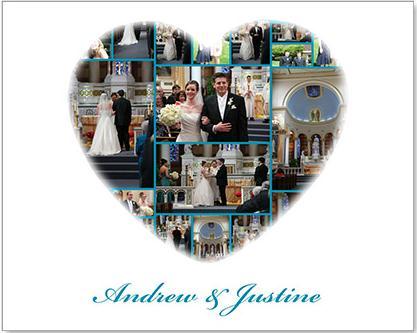
ScrapWalls lets you create easy collage; you have choice whether to create simple customary collage or unique collages in different shapes and sizes. The interface of the application is also very easy and simple to use and create. The application does not load you with too many steps and long procedures to create collages. If you have digital galleries of yours and want to present someone special some beautiful memories, than probably collage is the best way to present your pictures and bring back those memories to life!
ScrapWalls will allow you create automatic collage into various shapes. Choose from wide variety of shapes available with the application. They have more than 25 shapes in their template gallery, which ranges and varies as per the occasion. You can choose birthday cake shape too match the pictures of birthdays or simple maple leaf and dog structure for fun purpose. have every desired shape in their template gallery to suit your mood.
ScrapWalls enables you to create a collage consisting of 2-300 photos of yours. That means you can accommodate up to 300 snaps of yours in the collage depending upon your gallery size. Thus, the collage size in the application varies as per the number of photos you want in collage. Small size (2-50 photos), medium (4-100), large (6-150) and x-large (10-300); easily create your collage using these sizes and share them absolutely free on web.
The ScrapWalls will create your collage in just three simple steps:
- Pick a shape for your collage
- Upload photos
- Share
This web application is completely web-based, that means you need not install or download anything. The automated interface is so easy that even a kid can use the application with ease. Also read Xtreme Photo Designer and PhotoVisi for making collages.
As you upload photos in your collage using internet, the application will automatically place all your snaps in the collage shapes determining its size and compression. You can adjust the snaps in the collage to make it tailor-made. The application provides you auto-adjustment technology which will ensure everything aligns perfectly with no overlapping and no ugly gaps.
ScrapWalls is a good free software to create collages in your desired shapes.
