Blackberry Master Control Program is a free Windows application that allows user to have control over their Blackberry. This free utility consolidates all functions of the device, into one application. It is important to note, however, that misuse of this free program could result in data loss. Users are able to perform a variety of Blackberry functions from the Java icon on their Windows computer.
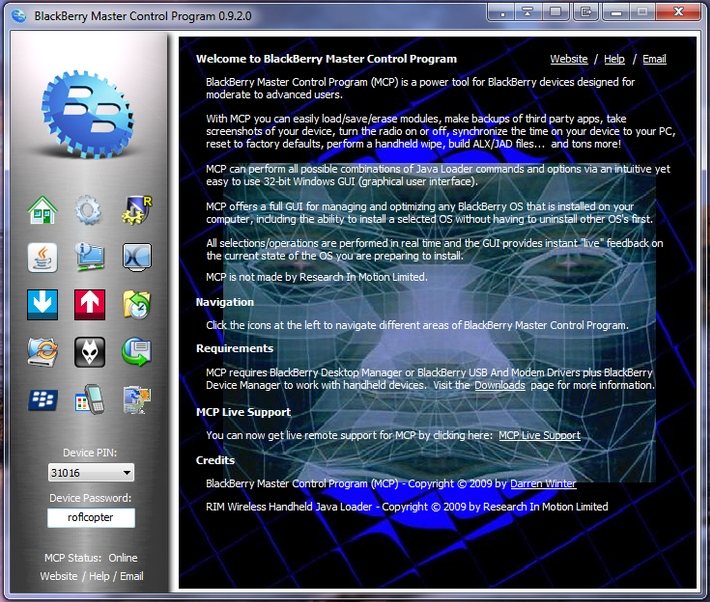
There is no need to load the Blackberry desktop or manually manipulate the device by hand. Users that have installed this free Blackberry Master Control Program on their computer are able to switch the cellular radio and wi-fi connections to either off or on. Users are also able to recover flash memory and set the device’s clock remotely.
In the advent the device becomes overloaded with information, the option to reset the device to its factory state can be performed in minutes. Completely wiping applications or the file system in minutes, allows users to the choice of reformatting the device to suit their needs. Finally, users are able to run the command prompt and run the Java loader; this gives users extra functions and options.
All the icons and explanations for navigating this free Blackberry application are clear and concise. All that is required is common sense when deleting, setting or resetting functions. On the Information screen, device logs and other information is easily accessible. This particular screen is handy for when users are troubleshooting or need to provide information to application manufacturers and/or Blackberry support.
The Screen Capture allows users to capture screenshots of the device itself. This option, also, is useful when dealing with Blackberry support, as the Blackberry model and product number can be saved in a screenshot. The loading of modules from a PC is a simple action and easily understandable instructions make the exercise able to be completed in minutes.
Users are able to pull up a list of all modules on the device and erase or save these add-ons at will. In the event you do choose to erase a module, it is important to erase all the components of that module to avoid problems with the device. The backup and restore allows users to store modules and restore them at a later date. This particular option in this free application is probably the most important as it will ensure that all user data is not lost forever – in short, backing up is always a good idea.
From the Operating System Management screen users are able to understand which device operating system he or she currently has running on the machine. Users can therefore choose a different operating system should he or she desire. Interesting to note; this screen also provides links to websites where operating system are able to be downloaded. You can also try a free application for Blackberry which reads SMS and emails aloud, which comes in handy when you are driving.
Area 51 is a screen that requires the utmost caution as it allows users to send Java loader commands directly to the device. Ideally people with experience or skill are advised to use this function. Overall Blackberry Master Control Program is a good software to manipulate the applications on your blackberry through your PC. So go ahead and give it a try.
