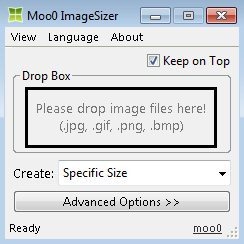
Moo0 ImageSizer is free image resizing software to resize images. This image sizer is a free tool to increase or decrease the pixel size of the images on your Windows PC.
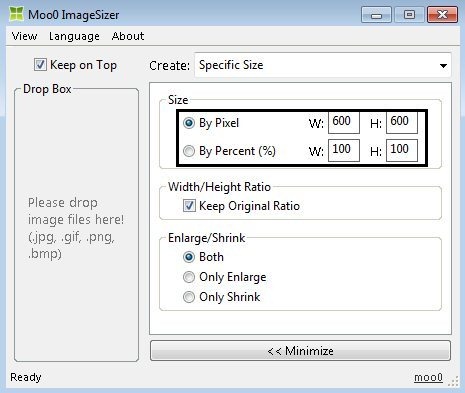
This image resizer freeware provides you the option to resize images by pixels and percentage. You can even create image of multiple sizes in one go with Moo0 Image Sizer. You can create any number of images from one image with different resolutions or pixels.

I actually didn’t like this image sizer a lot. The reason is its limited options. MooO image sizer doesn’t provide too many options to explore and customize images. I would recommend you to download and install “Paint.net” on your desktop and laptop to customize and resize images with ease.
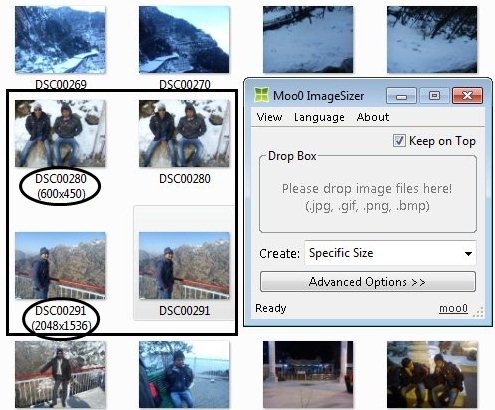
Remember: The output of MooO ImageSizer will be in the same folder from where you earlier picked the images and dragged into Moo0 image sizer.
Check out VSO image resizer to reduce size of digital photos reviewed by us.
Features Of Moo0 ImageSizer To Resize Images:
- Resize images on your desktop.
- The tool supports jpg, gif, png, and bmp image formats. You can drag and resize images of these formats.

- Supports creation of specific size image or various size images.
- Set the size by pixels or percentage.

- Have the option to keep original width or height ratio.
- Enlarge or shrink the image size.
- Provides created images output in the same folder from which the images were dragged.
- Provides long list of languages to switch.
Check out bulk resizer for batch image resize reviewed by us.
How To Use Moo0 ImageSizer:
- Download and install Moo0 ImageSizer software.
- Launch the software.
- Open the folder from which you want to drag the image file. Select the image file and then drag it into MooO ImageSizer on your desktop.
- Tap on advanced option, adjust the pixels or percentage of the image size.
Tap on minimize and then you will see a new image file created in the same folder from which you picked up and dragged the image file to Moo0 ImageSizer.
Install Moo0 ImageSizer:
- Visit the webpage to get the download link of Moo0 ImageSizer.
- Scroll down and then tap on download button. Your download will start immediately.
- Double click on the downloaded setup and install MooO ImageSizer software by following further instructions.
Install MooO ImageSizer software to resize images on your desktop or laptop. Make your images lightweight and then share them easily from your desktop.
If you are using any other software to resize images on your desktop or laptop, then do let us know in comments section.
