• Home
  • Software Testing Service
  • About US
    • Privacy Policy
    • Disclosure
  • Write For Us
  • Submit Software
  • Contact Us
    • Subscribe
I Love Free Software
Best free software available all over the web. The free software categories include Windows Software, Social Networking Tools, and software installation videos.


  • Featured
  • Windows
  • Web Applications
  • App Store
  • Android
  • iPhone
  • iPad
  • Windows 8
  • Social Networking
  • Programming Tools

How To Add GPS Shortcut Icon On Android Home Screen

By Lalit Aggarwal on May 6, 2012 | Sponsored Links

Here, are quick and easy steps to add GPS shortcut on Android home screen. A new or normal Android phone has very less or no icons on its home screen. For enabling Wi-Fi, Bluetooth or GPS we need to head to settings menu on our Android phone. Every time accessing settings menu is bit long and boring process to perform on Android.

There should be something that we tap on our Android home screen and enable all these services. I found a way out to add GPS shortcut icon on Android home screen. So just follow the below steps to add GPS shortcut icon on Android home screen.

Steps To Add GPS Shortcut Icon On Android Home Screen:

Step 1: Long press on your Android home screen in the empty or blank space.

Step 2: Select “widget” option to add a smart widget on Android home screen.

Step 3: Select “power control” widget from the list of widgets.
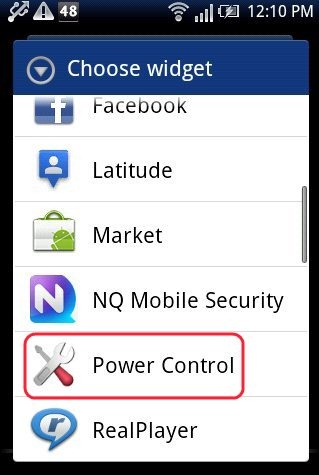
Power Control Widget
Sponsored Links

Step 4: Now you will see widgets with smart options which includes Wi-Fi icon, Bluetooth icon, GPS shortcut icon and more.

Step 5: You can then anytime switch GPS ON or Off directly from your Android home screen.
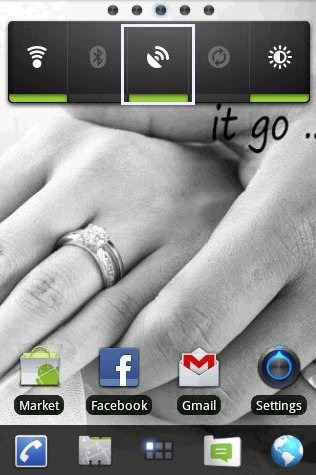
GPS Widget

Just make your work easier and faster by adding this smart widget on your Android home screen. Just explore other option with smart widgets which include Wi-Fi shortcut, Bluetooth Shortcut, adjust brightness and more. The widget looks smart when applied on Android home screen. Just Customize your Android screen by your choice.

Also, you can check out Widgetsoid2.X app to add smart widgets on your Android home screen. After installing Widgetsoid2.X app, you can add maximum widgets on your Android home screen. I really liked this Android Widgetsoid2.X app as I added all my favorite widgets on Android home screen.

Link to This Page:


No related posts.

Be the first to know about Latest Free Software:

  • Join us on Facebook
  • Subscribe to our RSS Feed
  • Follow us on Twitter
  • Subscribe to Email Updates:

Posted in Android | Tagged android | Leave a response

Lalit Aggarwal

« Previous Next »

Featured Posts

  • 5 Apps For Windows 8 To Record Sound
  • Top 7 Free Launchers for Android
  • 5 Free Snippet Managers To Manage Code Snippets
  • 5 Free Online Tools To Test Website In Different Resolutions
  • 5 Free Microsoft Access Alternatives
  • 5 Free IP Notifier Apps
  • 5 Online Mapping Websites
  • 5 Free Alternatives To iGoogle

Join More than 15,000 Followers!

Enter your Email Address
  • Submit Software
  • Software Testing Service
  • Write For Us
  • About Us
  • Privacy Policy
  • Disclosure
  • Contact Us

Link to Us:

Did we review your software here? Feel free to flaunt this badge on your website:

Free Software

Use this Code:

Copyright © 2013 I Love Free Software.

Powered by WordPress and Hybrid. New - H