Conloco is a free software updater tool that windows users can use to keep their programs up to date. The program can also be used to quickly and efficiently reinstall programs. The program maintains a list of programs in a catalog. You can view the currently installed versions, currently available versions and links you can use to view the updates available.
Features of Conloco software updater
- Batch download and installation of programs
- Ability to add custom items on the Catalog
- Automates search and retrieve latest versions of programs
How to use this software updater freeware
Installation was totally uneventful. The interface is quite simple. It consists of a menu bar at the top, Catalog section to the left and the program information system to the right centre.
Click on any of the listed programs in the catalog section to view a brief description of the software you clicked on. The description includes critical information like program author, website, current available version and the currently installed version. If the currently available and currently installed version do not match, you can download a copy of the latest version. Install it by checking it and selecting Download and install on the Actions menu. You can select all programs at once by checking the Catalog option or hide all programs by contracting the Catalog.
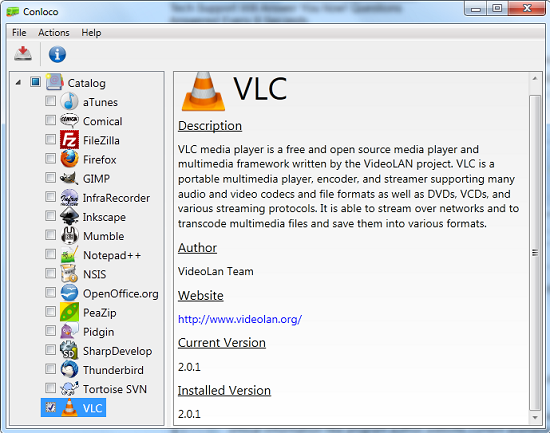
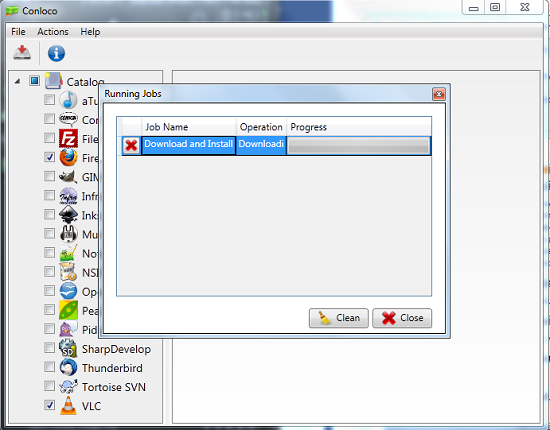
You can refresh the list of programs by selecting Refresh Catalog from the Actions menu. To add new software on the catalog list click Create plugin from the File menu. You need to enter a name, choose a location to list the new plugin, enter the name of the author and website and enter a brief description. You can view program logs by clicking View logs from the Actions menu. Users can view programs being downloaded at any particular time by clicking View Jobs. You can cancel jobs by clicking the red cancel button or and monitor download progress using the progress bar. You can empty the list of jobs by clicking Clean.
You can also check out other free software updaters reviewed by us.
Pros
- Very simple software updater utility and easy to use.
- Batch download and installation.
Cons
- No automated or scheduled download of new versions.
Conclusion
Conloco is simple but powerful software updater tool that easily and conveniently keeps all your programs up to date.
