LiveGO is free online solution for instant messaging service and social network as well. In case you do not want to install messengers in every computer you use or you do not want to install one messenger for each service, LiveGO the instant messaging service is the solution for you. LiveGO helps you to be in touch with your friends with social networking and IM services.
With LiveGO you can simultaneously log in to all the IM clients like MSN aka Live Messenger, Yahoo messenger, Gtalk as well as your email accounts like Hotmail, Gmail or Yahoo mail. The list is not finished yet. You can also log in to social networking sites as Facebook and Twitter to get social updates.
Update (3-Sep-2012): LiveGo seems to be dead now. Instead, you can use other services that are linked to in this article.
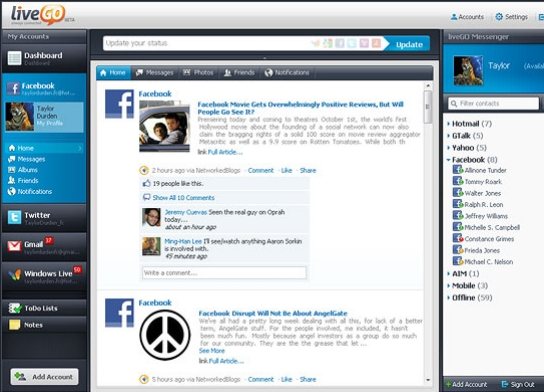
In order to use LiveGO you do not need to install any software or add-on. Even you do not have to open further accounts to use this free instant messaging service. In other web messenger services or chat clients you have to usually open an account in order to use them. You will be able to log into your messenger service directly from the LiveGO page. The steps for using LiveGO web messenger are pretty simple. Go to LiveGO homepage. If you want to use Facebook you will have to connect it by clicking the provided link and in all other cases you will have to enter your user name and password after choosing service names. You can choose whether you want to be connected to the mail inbox or instant messaging or both by checking boxes before logging in. After logging in with one account you can always add more accounts by clicking the Add Account button at the bottom left corner of the screen.
You can also try Threadsy, Inbox2 and NutshellMail reviewed by us
Features of LiveGO:
- Hassle Free: This web messenger is completely hassle free in all sides. You don’t have to install anything and you don’t have to sign up to anything to use this service.
- Feature Rich: This web app is not limited as a web messenger. You can do a lot more than a web messenger with this like checking multiple email accounts or social networking sites altogether from a very organized page.
Open your favorite web browser and go to www.livego.com.