In this fast growing virtual world, more and more people are prone to promote there businesses, products, services, basically their commercial work online. And with Facebook, that has crossed all the world-wide dimensions, promoting and advertising commercial products and services has become even easier. Facebook comes up with an inevitable Fanpage Application that has become a prerequisite component to complete a business perceptibility on the worldwide web. Facebook is now a Facebook for business as well. It is undoubtedly an effective way of making a good lucrative business.
Creating a Facebook Fan Page is as easy as falling off a log, even a beginner can make a Facebook Fan Page in just a few minutes. It does not matter either you own a full-fledged company or a small business, creating a Fan Page is open to all and is the best way to make your business known. Fanpage will definitely increase your earnings and the best part is that it is completely Free Of Cost. Isn’t it WOW!!?? So far, you must have been spending loads of money for spreading awareness about your commercial work through hoardings or other media services. However, this Fanpage promotion contains Zero Cost. Moreover, these days most of the people carry out their work through Internet. Starting from a 5-year old kid to 90-year old elder, everybody is lying down to Internet, especially Facebook. Hence, Facebook Fanpage has become a must component to complete your business visibility.
How To Make Facebook Fan Page?
- Login into your Facebook Account
- Bottom right side of the page has an option to create a page. Click on “Create a Page”.

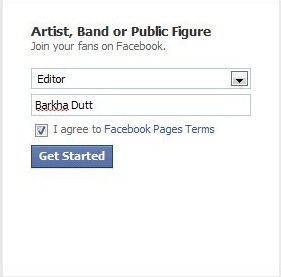
- Once clicked, you will be soon asked to define a purpose for which you want to create a Facebook Fanpage. For example: create a Fan Page for a Local Business, a Company, an Organization or an Institution, a brand or a product, artist, band, for a cause or just for fun and entertainment. You will be required to select one from the given 6 purposes. Like I clicked on “Artist, Band or Public Figure”.

- Click the drop-down arrow to select the exact category and write a name of the concerned artist . Like I selected “Editor” and wrote “Barkha Dutt”.
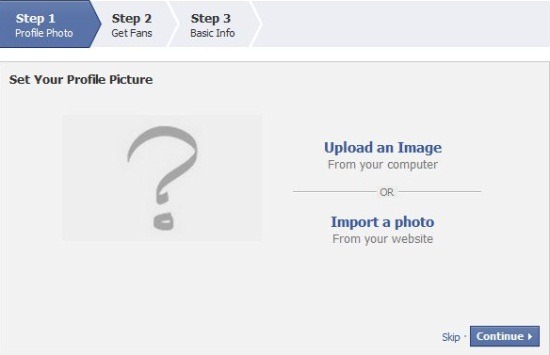
- Thereafter, you will be asked to upload a picture. Quickly upload it. In case you do not want to upload any picture, just click on “Continue”.
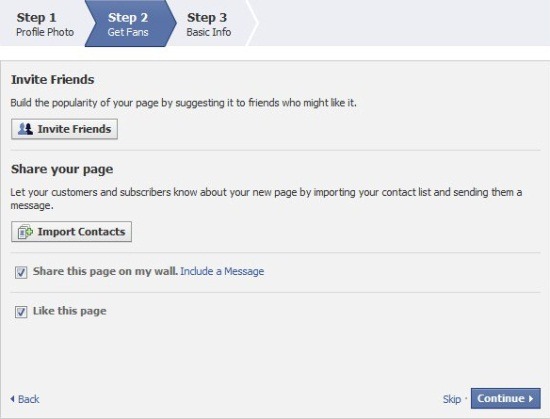
- Now, you will be asked to invite friends, share your page. You can invite your entire friends list or some selected ones. Also you can let your customers or subscribers know about your new Fan Page by importing your contact list and sending them a message. For this, just click on “Import Contacts”, to add a message, click on “Include a Message” link. Once you are done with this step, click on “Continue”.
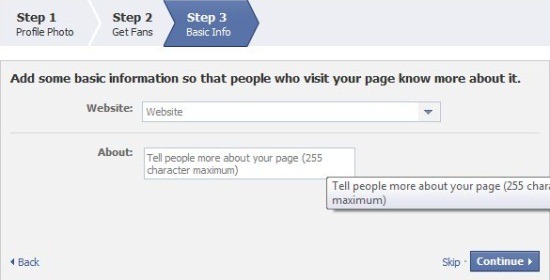
- You are now required to add some basic information about your website or business so that people who visit this Fan Page, know more about your work. Once you are done, click on “continue”.
- Yup…You will soon be taken to your all new Facebook Fan Page.
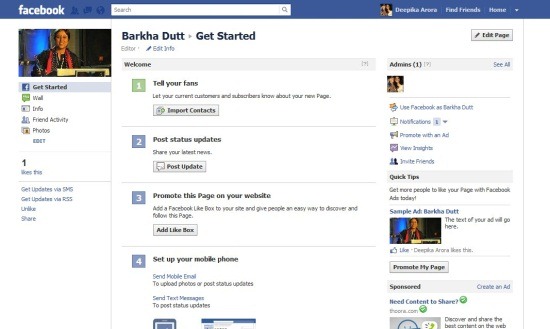
However, one thing I would like to inform you, Some people have a myth that if they create a Fanpage using their personal account the fanpage will display their personal info as well. Lot of times people create an entirely new Facebook account just to create a fanpage. Let me tell you guys…its just a myth. You can create a fanpage using your account and you then get the option to choose if you want to use your account as yourself or as a page. If you are using the account as a page, none of your personal information gets displayed. Facebook Fanpages never displays your personal profile.
There are various Facebook Chrome Extensions reviewed by us which will let you directly visit Facebook or use Facebook Applications.
In short, making Facebook Fanpage is a good useful service in the sense that it gives you a way long to speak your target audience and get instant feedback. Go ahead and create your own Business Facebook Page or create just for entertainment. Its Free!!
