OfficeSuite Viewer 5 is a free Android app to open and view office documents on Android. The most appreciating part of this office document viewer app is that it allows you to access office documents at a faster speed as compared to other Office document viewer apps. Just view office documents including multiple document formats. This office document viewer provides multiple options to view office documents in an easy way.

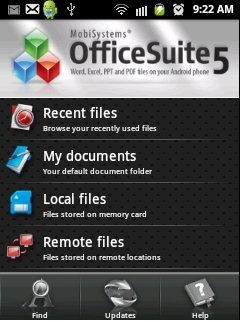
OfficeSuite Viewer 5 app provides an easy to understand interface. It makes easy to read multiple office documents formats with a very clear and real view on Android. This office document viewer app reads following office documents formats which includes DOCX, PPS, PPT, RTF, TXT, DOC, PPTX, PDF, EML, LOG, CSV, XLS, XLSX and ZIP Files. The app is very fast as it also allows you to access the recently opened files on Android. With this, you don’t need to search for any document which you have recently accessed and closed.
You can also check out Documents To Go Main Android Office App reviewed by us.
Some Key Features Of OfficeSuite Viewer 5 App To View Office Documents:
-
Open and view office documents on Android with this office documents viewer app.
-
The interface provided by the app is very simple.
-
Open and view recently opened files and documents from within the app.
-
You can view your default document folder directly from this office document viewer app.
-
Open any office document file from your SD card through this app.
-
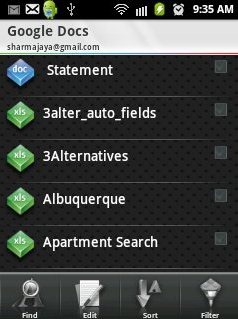
You can also view remote files by adding your email account in the app. The app will import all your office documents automatically from your email. For e.g. as you add your Gmail account, the app will import all your Google Docs from your Gmail account.
-
You can add multiple accounts to access office documents of any account from within the app.
-
You can search for any document file from the list of files displayed in the app.
-
The app allows you to cut, copy and paste any document or file from SD card to any remote location or to any other folder and vice versa.
-
Sort the document list by name, size, type and date modified.
-
Create any new folder from within the app.
-
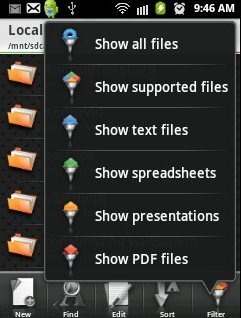
Also, apply filter on the list of documents and the app will show the document type accordingly.
Also, check out Kingsoft Android Office Reader app to read MS office files on Android reviewed by us.
How To Install OfficeSuite Viewer 5 App On Android:
-
Scan the QR Code below with Barcode Scanner app for Android.

-
Another option to download and install the app is to search OfficeSuite Viewer 5 app in Android Market.
-
After searching OfficeSuite Viewer 5 app from Android Market, tap on install button.
-
Install the app on your Android.
The free OfficeSuite Viewer 5 app to view office documents will be automatically installed. Click here to download OfficeSuite Viewer 5 App from Android Market. Open and view office document on Android in an easy way with this office document viewer app. Make your work faster and easier by installing this app on your smart phone.
