• Home
  • Software Testing Service
  • About US
    • Privacy Policy
    • Disclosure
  • Write For Us
  • Submit Software
  • Contact Us
    • Subscribe
I Love Free Software
Best free software available all over the web. The free software categories include Windows Software, Social Networking Tools, and software installation videos.


  • Featured
  • Windows
  • Web Applications
  • App Store
  • Android
  • iPhone
  • iPad
  • Windows 8
  • Social Networking
  • Programming Tools

Pulmon: Windows 8 UI for Windows 7

By Jaya on August 4, 2011 | Sponsored Links

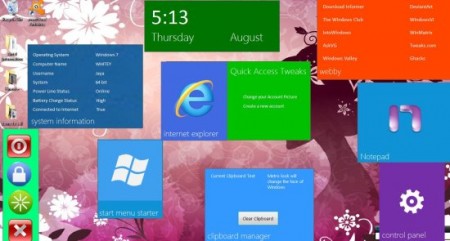
Pulmon is a free app which brings Windows 8 like features for your desktop. It arranges data in format of beautiful metro tiles. These tiles contain various options like Internet Explorer, control panel, etc. Clicking on these tiles will open the respective program.
pulmon
Sponsored Links

Pulmon is a free download for PC’s running Windows 7. Though it still is a beta version and might be unstable. So before installing you would want to back up your important data.

The download is rather annoying as it ships in RAR format, that means you will need a suitable compression tool to access it. RarZilla would be one good option to decompress a RAR file. Once the app is extracted, run the file pulmon.exe to launch the program. It is a portable app therefore, no installation required.

Here is how to use Pulmon:

  1. When you launch the program you will see two sections in the program window, one is “Add Tiles” and the other “Remove Tiles”
  2. When you click on a tile in the Add section e.g Control Panel Tile
  3. It will add Control Panel tile to your desktop and will remove the Control Panel tile from “Add Tiles” group. Now you will be able to see this Control Panel tile in “Remove Tiles” section.
  4. So if you want to remove it, just click on the Control Panel Tile again present in the remove section.

You can also check out other articles like Dexpot, Moo0 MultiDesktop and Virtual Dimension.

The tiles can be moved around screen and you can interact with them as well. They mainly contain links, shortcuts, information to various other system functions.

Windows has promised further updates with more tiles for this Pulmon Metro UI. But it wouldn’t be wrong to say that this new Metro UI look will change the face of Windows…Literally!

Home Page: Click Here
Works With: Windows 7
Free / Paid: Free

Link to This Page:


You Might Also Like:

  1. 5 Free Software To Get Windows 8 Look On Windows 7
  2. Complete Guide to Metro UI of Windows 8
  3. Windows 8 UI On Windows 7, Vista, XP: Windows 8 Transformation Pack
  4. How to Get Windows 7 Start Menu in Windows 8
  5. Windows 8 UX Pack To Get Windows 8 Look in Windows 7

Be the first to know about Latest Free Software:

  • Join us on Facebook
  • Subscribe to our RSS Feed
  • Follow us on Twitter
  • Subscribe to Email Updates:

Posted in Desktop Enhancement, Windows | Tagged beta version, windows 7, windows 8 | Leave a response

Jaya

« Previous Next »

Featured Posts

  • 5 Free Snippet Managers To Manage Code Snippets
  • 5 Free Online Tools To Test Website In Different Resolutions
  • 5 Free Microsoft Access Alternatives
  • 5 Free IP Notifier Apps
  • 5 Online Mapping Websites
  • 5 Free Alternatives To iGoogle
  • 7 Websites To Download Windows 8 Themes
  • 5 Best Free Calculator Apps For Windows 8

Join More than 15,000 Followers!

Enter your Email Address
  • Submit Software
  • Software Testing Service
  • Write For Us
  • About Us
  • Privacy Policy
  • Disclosure
  • Contact Us

Link to Us:

Did we review your software here? Feel free to flaunt this badge on your website:

Free Software

Use this Code:

Copyright © 2013 I Love Free Software.

Powered by WordPress and Hybrid. New - H