• Home
  • Software Testing Service
  • About US
    • Privacy Policy
    • Disclosure
  • Write For Us
  • Submit Software
  • Contact Us
    • Subscribe
I Love Free Software
Best free software available all over the web. The free software categories include Windows Software, Social Networking Tools, and software installation videos.


  • Featured
  • Windows
  • Web Applications
  • App Store
  • Android
  • iPhone
  • iPad
  • Windows 8
  • Social Networking
  • Programming Tools

Myna: Free Online Audio Editor to Mix your Tracks

By Ishan Bansal on October 4, 2009 | Sponsored Links

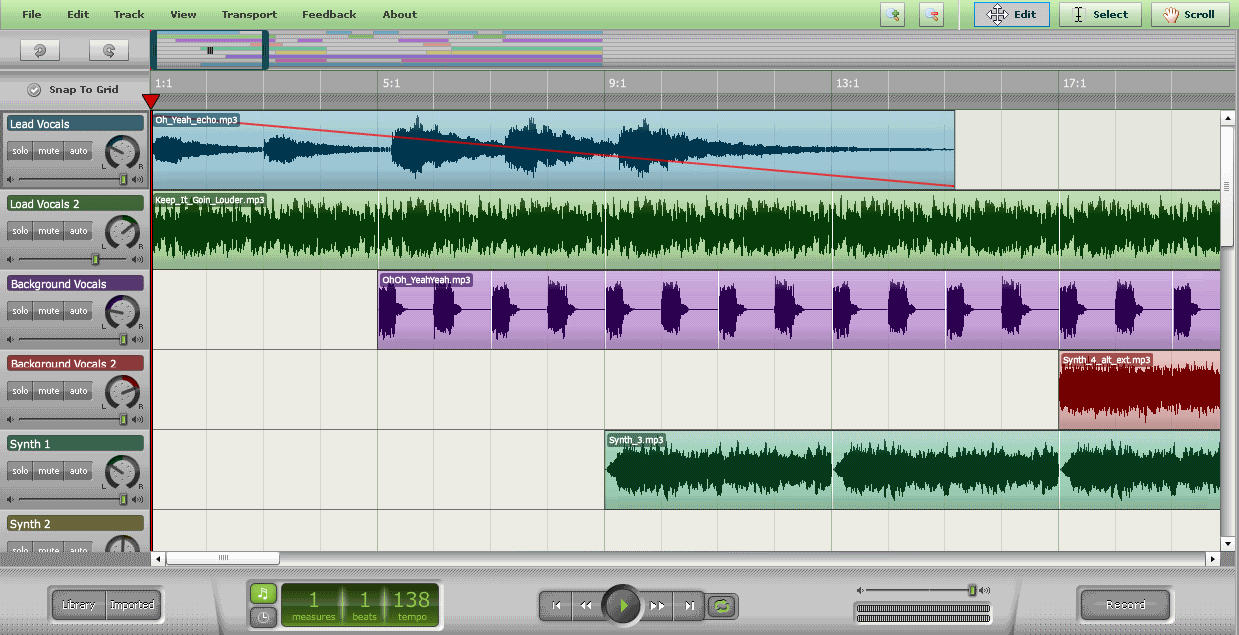
Myna is a completely browser based online Audio Editor. It provides amazing capabilities to mix multiple tracks, and create your own mix online. As it is completely browser based, you do not need to download or install anything. Even though it is browser based, the interface really rocks, the processing speed is so fast that you feel that you are working with a desktop application.
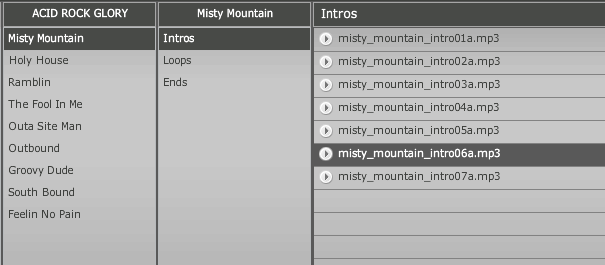
Myna provides option to mix 10 tracks together. You can either select tracks from your computer, or you can select from the vast library of free tracks that Myna provides. Once you have selected the tracks, you can place them on grid to visually manage their position, start time, end time, and relative overlap with other tracks. You can very easily move them around, and rearrange as you want. At any time, you can hear your composition from any point to tweak your settings. Myna provides some really good controls to create your mix. If you need more advanced features, you can try LMMS with Fruity Loops type capabilities, or UltraMixer 2 to mix up your songs.
Myna also lets you record your own voice, and add it to the mix. You do not need a separate voice recorder for that, Myna provides controls for that too. Once you have recorded your voice, it is available as one of the track that you can add anywhere.
After you are done with your mixing, Myna lets you to download your mix to your desktop, or even store on Myna’s server online. You can create a free account with Myna, and then directly access your creations, and modify them. Myna also lets you to collaborate with other users on any of your creation.
Here are some of the great features of this free Online Audio Editor:
You can Trim, Loop, Stretch and Reverse your audio clips, width editable loop points, and interactive time stretch capabilities.
You can easily add fade-ins, fade-outs, pan from left to right, and modify gain over time, with editable control points.
Add non-destructive effects to your audio clips including Pitch Change, Reverb, Delay, Parametric EQ, and more. files.
Import your own audio files, or search one of provided libraries. Mix it down and export directly to your desktop or publish back to your account.
Myna is really impressively created, and works very well.

Myna is a completely browser based online Audio Editor. It provides amazing capabilities to mix multiple tracks, and create your own mix online. As it is completely browser based, you do not need to download or install anything. Even though it is browser based, the interface really rocks and the processing speed is so fast that you feel that you are working with a desktop application.

Myna Free Online Music Editor
Sponsored Links

Myna provides option to mix 10 tracks together. You can either select tracks from your computer, or you can select from the vast library of free tracks that Myna provides. Once you have selected the tracks, you can place them on grid to visually manage their position, start time, end time, and relative overlap with other tracks. You can very easily move them around, and rearrange as you want. At any time, you can hear your composition from any point to tweak your settings. Myna provides some really good controls to create your mix. If you need more advanced features, you can try LMMS with Fruity Loops type capabilities, or UltraMixer 2 to mix up your songs.

Myna Track Library

Myna also lets you record your own voice, and add it to the mix. You do not need a separate voice recorder for that, Myna provides controls for that too. Once you have recorded your voice, it is available as one of the track that you can add anywhere.

After you are done with your mixing, Myna lets you to download your mix to your desktop, or even store on Myna’s server online. You can create a free account with Myna, and then directly access your creations, and modify them. Myna also lets you to collaborate with other users on any of your creation.

Here are some of the great features of this free Online Audio Editor:

  • You can Trim, Loop, Stretch and Reverse your audio clips, width editable loop points, and interactive time stretch capabilities.
  • You can easily add fade-ins, fade-outs, pan from left to right, and modify gain over time, with editable control points.
  • Add non-destructive effects to your audio clips including Pitch Change, Reverb, Delay, Parametric EQ, and more. files.
  • Import your own audio files, or search one of provided libraries. Mix it down and export directly to your desktop or publish back to your account.

Myna is really impressively created, and works very well.

Video Tutorial: Click Here
Home Page: Click Here
Free / Paid: Free

Link to This Page:


You Might Also Like:

  1. Online Audio Editor Free: FileLab Audio Editor
  2. Download Jokosher – Free Audio Editor and Track Mixer
  3. Audacity: Free Audio Editor for Windows, Mac, and Linux
  4. 4 Online Voice Recorders
  5. Learn How To Mix Audio Tracks With Pinnacle Audio Mixer

Be the first to know about Latest Free Software:

  • Join us on Facebook
  • Subscribe to our RSS Feed
  • Follow us on Twitter
  • Subscribe to Email Updates:

Posted in MP3 & Audio Software | Tagged browser based audio editor, edit tracks in browser, free audio editor, mix tracks online, myna, myna audio editor, online audio editor | 3 Responses

Ishan Bansal

  • Pingback: Audio Sliders: Replacement for Windows Volume Controls | I Love Free Software

  • Pingback: AudioTool: Create Music Online Free | I Love Free Software

  • Pingback: Download DarkWave Studio - Free Digital Audio Workstation | I Love Free Software

« Previous Next »

Featured Posts

  • Top 7 Free Launchers for Android
  • 5 Free Snippet Managers To Manage Code Snippets
  • 5 Free Online Tools To Test Website In Different Resolutions
  • 5 Free Microsoft Access Alternatives
  • 5 Free IP Notifier Apps
  • 5 Online Mapping Websites
  • 5 Free Alternatives To iGoogle
  • 7 Websites To Download Windows 8 Themes

Join More than 15,000 Followers!

Enter your Email Address
  • Submit Software
  • Software Testing Service
  • Write For Us
  • About Us
  • Privacy Policy
  • Disclosure
  • Contact Us

Link to Us:

Did we review your software here? Feel free to flaunt this badge on your website:

Free Software

Use this Code:

Copyright © 2013 I Love Free Software.

Powered by WordPress and Hybrid. New - H