Miranda IM is a free multi protocol instant messaging client that lets you connect to all popular instant messaging networks from one common place. Miranda IM supports Yahoo, MSN, AIM, Facebook chat, and much more. On top of that, you can extend the functionality of Miranda IM by using tons of plugins that are available for free.
[Also Read:7 Best Free Web Based Instant Messengers]
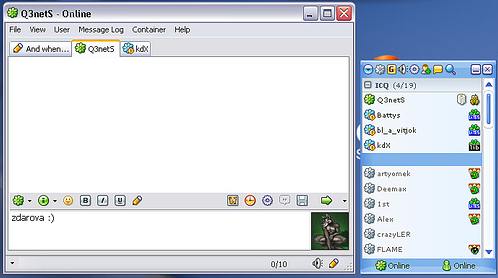
Here are some of the IM networks that Miranda IM supports:
- AIM
- Yahoo
- MSN
- IRC
- ICQ
- Gadu-Gadu
- Netsend
- Jabber
and many more..
So, you can just install Miranda IM, and chat with all your friends on different chat networks.
I have reviewed many such All-in-one IM clients earlier, like, Pidgin, Digsby, and Trillian Astra. What I really like in Miranda IM is that it has tons of plugins available. You can extend the functionality of Miranda IM a lot by using those plugins.
Miranda IM is completely free, and a nice all-in-one IM.
Free Software to Copy Blu-ray to DVD: Blu-ray to DVD Express
Blu-ray to DVD Express is freeware that can split and burn Blu-ray movies to DVDs.
Blu-ray to DVD is a high-performance application to split and burn Blu-ray movies to multiple DVDs. It can burn Blu-ray disc movies or harddisk Blu-ray files to AVCHD DVDs. Users are allowed to make customized settings and selectable burning. The adjustment of subtitles and audio tracks are both supported. Under the circumstance that the Blu-ray movie is encrypted, a third party decryption application, like AnyDVD HD, is needed.

Here are some features of Blu-ray to DVD Express:
l Perfectly splits and burns a Blu-ray movie to multiple DVDs
l 1:1 Blu-ray burning – 100% same to the original with absolutely no quality loss
l Excellent synchronized audio and video
l Selectable burning
l Saves all the subtitles and audio tracks
l Multiple types of source files supported
l Adds menu to the target DVD
(Note: Adding a menu will make the AVCHD disc incompatible with PLAYSTATION 3.)
l Defines the characters, font, color, background picture of the menu
l Pauses/Resumes the burning process
l Batch copying – You can define the number of discs to be burnt
l High burning speed
l Trial version – burns one Blu-ray disc for free
l mkv file reading support.
How to install Blu-ray to DVD Express:
Step1: Download the Blu-ray to DVD Express installation file onto your computer
Step2: Double-click on the installation file.
Step3: Follow the directions to finish the installation.
How to use Blu-ray to DVD Express:
Step1: Starts Blu-ray to DVD Express.
Step2: Click “Start” button to burn. Choose your source disc and click “Next”.
Step3: Choose the disc you want to burn and choose your target file directory and then click “Start”.
Step4: Complete.
If you want to accomplish more comprehensive and advanced functions such as customized copy, you can download Blu-ray to DVD Pro on http://www.opencloner.com .
Home Page: Click Here Download (Free): Click Here Works With: Windows 7, Windows Vista, Windows XP, Windows Me, Windows 2003, Windows 2000, Windows 98, Windows NT, Windows 95 Free / Paid: Free |
Link to This Page:
You Might Also Like: | Be the first to know about Latest Free Software: |

