SharpKeys is a free keyboard remapping software using which you can remap keys on your keyboard. This free keyboard remapping software basically lets you make keys on keyboard work like other keys. This keyboard remapping software supports upto 104 mappings. This tool works in a unique way, as it modifies the registry which further changes the default keyboard layout.
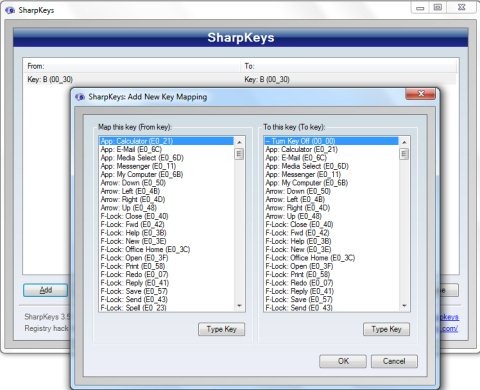
Sharpkeys comes with a very simple and straight-forward user-interface which can be easily understood even by the novice users. The main window of this tool comes with buttons like Add, Edit, Delete, Delete all, Write to registry and close. In addition, it basically shows you the keys that you have remapped from and remapped to. You will also find a specific window for choosing the keys to be remapped. Instead of choosing keys from this window, you can choose the keys by pressing the keys on the keyboard, which you wish to remap. Sharpkeys offer a very simple way to remap keys like never before. If you are a beginner and suppose any of your frequently used key on keyboard stops working, then I would suggest you to use this free keyboard remapping software. You may also try other software like KeyTweak and MapKeyboard to remap keys.
How To Remap Keys Using SharpKeys:
- Launch Sharpkeys.
- Click the Add button on the interface for adding your desired keys for remapping.
- This will take you to a new window with two columns that says Map this key and To this key.
- Select your desired keys in both the columns and hit the OK button below in the window.
- Now, you will come back to the main window, in which you need to click Write To Registry option.
- For the changes to take place, you need to restart your computer.
Key Features Of This Tool To Remap Keys:
- Lightweight keyboard remapping software with a file size of only 475 KB.
- Supports upto 104 mappings.
- User-friendly interface.
- Type key feature to choose keys directly by pressing the desired keys on the keyboard.
- Modifies the registry and changes the default keyboard layout.
- Delete button lets you delete all the re-mappings and changes the keyboard layout back to the default.
SharpKeys is one of the most simple and smart keyboard remapping software which I came across, as it offers a very simple way to remap keys like never before. Download SharpKeys for free.
