WinX iPhone Ringtone Maker is one of the best ringtone maker software for iPhone. You can take any audio file, and quickly convert that to Ringtone for iPhone. You can select the point in the audio file from which you want your ringtone to start, and ringtone duration, and WinX iPhone Ringtone Maker will generate iPhone ringtone for you.
How to Get WinX iPhone Ringtone Maker for Free:
This iPhone ringtone maker normally sells for $29.95, but the developers of WinX iPhone Ringtone Maker are currently running a giveaway where you can get WinX iPhone Ringtone Maker completely free.
The best part is that you don’t even need to do anything special to participate in this giveaway. Just visit WinX iPhone Ringtone Maker, and download it for free. This free giveaway is running till 10th of December only, so make sure you grab it before the giveaway expires.
How to Create Ringtone for iPhone:
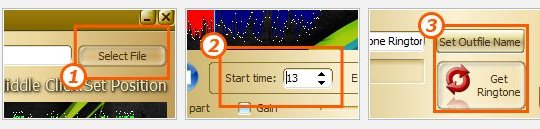
- WinX iPhone Ringtone Maker makes it extremely easy to create ringtone for iPhone. It is just a 3 step process.
- Select the audio file from which you want to create ringtone. WinX iPhone Ringtone Maker supports all popular media formats.
- Specify duration of the ringtone. You can do this by specifying start and end time for your ringtone, or by just selecting start and end time in play area of WinX iPhone Ringtone Maker.
- Click on “Get Ringtone’, and your ringtone will be saved in your selected folder.
Here are some of the features of WinX iPhone Ringtone Maker:
- Support for all popular audio formats, including, MP3, WAV, WMA, OGG, AAC, MP4, M4A, FLAC, FLA, MPC, MP+, MPP, AIFF, AC3, APE, MP2, MP1, M4B, XM, IT, S3M, MOD, MTM, UMX, etc.
- You can add fade-in and fade-out effects to ringtones.
- You can specify duration of ringtone, and also select start and end points from your specified audio file.
- You can increase or decrease volume of original audio, and also specify looping.
WinX iPhone Ringtone Maker is one of the best iPhone ringtone makers that I have come across, and I am quite happy to see that they are running this nice free giveaway. If you have an iPhone, or are planning to buy one in future, download this iPhone ringtone maker for free before the giveaway expires.
<h2>How to Get WinX iPhone Ringtone Maker for Free:</h2>
This ringtone maker normally sells for $29.95, but the developers of WinX iPhone Ringtone Maker are currently running a giveaway where you can get WinX iPhone Ringtone Maker completely free.
The best part is that you don’t even need to do anything special to participate in this giveaway. Just visit <a target="_blank" href=”http://www.winxdvd.com/iphone-ringtone-maker/” target=”_blank”>WinX iPhone Ringtone Maker</a>, and download it for free. This free giveaway is running till 10th of December only, so make sure you grab it before the giveaway expires.
<h2>How to Create Ringtone for iPhone:</h2>
<ul>
<li>WinX iPhone Ringtone Maker makes it extremely easy to create ringtone for iPhone. It is just a 3 step process.</li>
<li>Select the audio file from which you want to create ringtone. WinX iPhone Ringtone Maker supports all popular media formats.</li>
<li>Specify duration of the ringtone. You can do this by specifying start and end time for your ringtone, or by just selecting start and end time in play area of WinX iPhone Ringtone Maker.</li>
<li>Click on “Get Ringtone’, and your ringtone will be saved in your selected folder.</li>
</ul>
<h2>Here are some of the features of WinX iPhone Ringtone Maker:</h2>
Support for all popular audio formats, including, MP3, WAV, WMA, OGG, AAC, MP4, M4A, FLAC, FLA, MPC, MP+, MPP, AIFF, AC3, APE, MP2, MP1, M4B, XM, IT, S3M, MOD, MTM, UMX, etc.
You can add fade-in and fade-out effects to ringtones.
You can specify duration of ringtone, and also select start and end points from your specified audio file.
