| Sponsored Links |
RealPlayer SP is one of the best media players that I have come across. The features are all useful, and easy to use. Download using links at the end.
RealPlayer has came out with a new version: RealPlayer SP. When I went through the feature list, I was pretty amazed. Here is an overview of this free media player (you can check out video overview here).
Download Videos from YouTube, and thousands of other sites
RealPlaye SP provides one click download from Youtube, and many other online video websites. When you are playing a video in your browser, RealPlayer SP will a download button over the video. Just click that and your video will start downloading. You can download multiple videos simultaneouly. It can even download and play Flash videos.
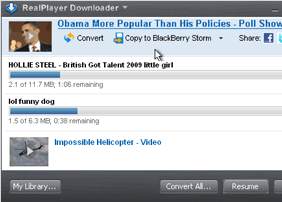
Convert and Copy Videos to iPod, iPhone, iTunes, BlackBerry, Xbox, PS3
RealPlayer SP comes with a built-in free video and media converter. This enables you to convert your audio and video to your mobile device format. Using this, you can convert and copy your videos to iPod, iPhone, iTunes library, BlackBerry, Xbox, and PS3! The conversion process is as simple as it can get – just click on the “Copy To” link next to your video, select your device from the list, and RealPlayer SP will convert the video directly to your device’s format and copy it to your device.
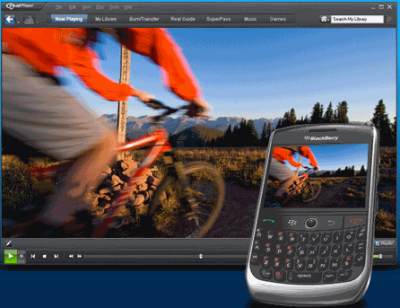
Share Video on Facebook and Twitter
RealPlayer SP has added social networking features. Now you can share your videos with your friends on Facebook and Twitter. Its very easy to do so using built-in sharing functionalities.
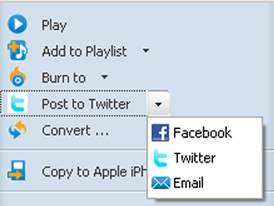
Apart from above, RealPlayer SP comes with all the great features that RealPlayer is popular for:
- Plays all popular media formats including Flash, Quicktime MPEG–4, Windows Media, DVDs and CDs.
- Comes with a built-in media browser so that you can surf the web while listening to your media.
- High quality play back of videos.
- Works on Windows, Mac, Linux
- Completely Free.
RealPlayer SP is one of the best media players that I have come across. The features are useful, and easy to use. Download links, and Video Tutorial at the end.
Download RealPlayer SP ** FREE **
Works With: Windows |
Be the first to know about Latest Free Software |


how can we can download youtube videos on youtube. i cannot download it plzz tell me.
Hey buddy… its quite easy. Install RealPlayer SP. Then when you go to some YouTube video, you will see an option to download video just above the video. That’s it!
how can we can download youtube videos on youtube. i cannot download it plzz tell me.
Hey Bayan,
Thanks for dropping by. It is actually very easy to download youtube videos with RealPlayer SP. Just install the RealPlayer SP on your system. Then, when you watch some video on YouTube and take your mouse over the video, you will see an option at top right corner of the video to download the video. Just click on that option, and your video will download. Let me know if you face any problem.
[...] RealPlayer SP Free: Download YouTube Videos [...]
[...] RealPlayer SP Free: Download YouTube Videos [...]
its very hard to convert music to videos
@Mohannad: Music to Videos? or do you meant Video to Music?
[...] RealPlayer SP Free: Download YouTube Videos [...]
i want to buy this
@Mahad: The version that I have reviewed is totally free.. no need to buy. The paid version has many more features, but I never felt a need for those.
where to find the totally free? may you give me the link?
i want to download realplayer sp as soon as possible
My name is amir hamza im a user of realpayer and i love it alot coz it has alot of features and its voice is dazzling…………………
@Amir: I am a big fan of Real player too. This is my one stop solution for playing all types of music and videos
[...] RealPlayer SP Free: Download YouTube Videos [...]
[...] RealPlayer SP Free: Download YouTube Videos [...]
good 1
hi i am looking forward to free download realplayer.thanks
download realplayer sp
molto belisima
janb order to karen.ap ka hukam ka gulam.
Real player SP for downloading videos from youtube.com
i think download realplayer sp free, is the best,,,
thanks
@jun: Real Player is indeed pretty good. Try some other music player also some time :)
hi dose any 1 know y if i download a video from the youtube it dosent download it did b4 bu not any more how do i fix it it says uneble plzz sum1 get bk 2 me thanx..
@Shaun: If you are not able to download videos using Real Player, you can try one of these free youtube downloaders.
hai, why i cannot find link for download real player sp with totally free, not the free 14 days trial one?
@fifi: Sorry Buddy – It seems Real pointed the URL that I was using to their paid version. I have updated the URL to free version again.
hiiiiiiiiiiiiiiiiiiiiiiiiiiiiiiiiii
It is amazing irreable
if i finish downloading , how can i put the video in my PSP ?
[...] If you do not have a good internet connection, it is better to use a desktop media player, like RealPlayer or BS.Player. [...]
real player rocks to the max
real player rocks to the max.
[...] the media players that you might have in your PC. If you do not want this MediaPortal, you can try RealPlayer, or MediaMonkey. var linkwithin_div_class="linkwithin_hook";var linkwithin_site_id=111278; [...]
hi i want to download real love but i cant
@marmarilove: Can you tell me what problem are you facing?
[...] Secure. Find More Information About Music:Aside from all the usual features you would expect from a free music player and free music organizer, Jaangle boasts an excellent system for finding more information on the [...]
[...] media files. All these media players are completely free, and support multiple media formats.1. RealPlayer SP FreeReal player is a free multimedia player that supports almost every audio and video file formats [...]
When you download the videos from youtube and other sites, is the download of the videos free as well, or is there a fee for downloading them?
@Harley: The download of videos is completely free. In fact, RealPlayer is my personal favorite for downloading youtube videos.
[...] Converter.You do not need any special software to play downloaded files. You can play these in your favorite media player. Hulu Video Downloader is as easy to use as some Youtube downloaders out there. Hulu Video [...]
hi i hope all the members of this site are happy and enjoying their lives happily .
can anybody tell me how can i download real player from this site ?
@hamid: The download link is present at end of article. Just click on that, and the download should start immediately.
It is very useful article…Can any one tell me how to attach it with Google Chrome to download videos?
@Alike: When you install it, it will automatically attach with Chrome. Whenever you watch any video on Chrome, you will notice a small download link when you hover over the video.
Its a useful software.How can I attach/ enable it with all my web browsers eg. google chrome, safari , avant …to download videos ? please reply me .
Thanks for the reply Sir …I did as you said …but it isn't working in chrome these days…. it was ok some days back …but now its not …please guide me …thanks in advance
I would like to use real tplayer youtube
good player
good
I’ve got a problem with this…
When i go to Youtube to download videos, the button dosn’t show up.
I have it on my other computer, and it works there….