CustomExplorerToolbar is a small but handy utility for Windows 7 which allows the user to add customized button to the toolbar of windows explorer. That may not sound that much interesting to many Windows 7 users but who are too dependent on the Windows XP interface and want to have the same benefits of the toolbar buttons on Windows 7 this software means much more to them. It is a free windows explorer toolbar customizer designed for Windows 7.
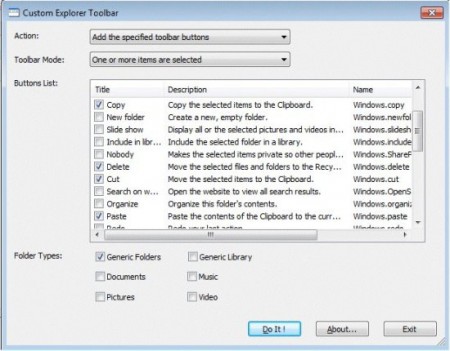
In Windows XP or other previous versions of Windows there were many buttons in the Windows Explorer toolbar which were always present. The buttons included Cut, Paste, Copy, Up etc. But now the way the Explorer is designed a new user does not feel the necessity of those buttons and the alternatives are just fine. But the old school Windows users who are accustomed to the cut, copy or paste buttons must miss these buttons in Windows 7. For them CustomExplorerToolbar will be a great relief. But adding the old button is only the part of this free windows explorer customizer.
Once the user knows what he wants he can add so much more than the old Windows buttons which can be like Select All, Slide show, Redo, Undo, Include in Library, Organize and a lot more options. It is the choice of the user. There will be a good number of options give to the user on what buttons he wants to keep on his Windows Explorer toolbar. The number of buttons is so many that the user will not be able to use all of them at the same time. In fact he will not be able to use half of them at the same time. So what the user will have to do is to select which tasks he does more often than the others. Then he will have to select those using check boxes and then click the ‘Do It!’ button.
If you do not want to appear those buttons in all folders you can select them which buttons will appear in which kinds of folder. That means you will be able to select separate buttons for Video, Pictures, Music and General folders with this free windows explorer toolbar customizer.
If you want to replace Windows Explorer, You can try SE-Explorer, CubicExplorer and Tablacus Explorer reviewed by us.
Features of CustomExplorerToolbar:
- Easy to use and feature rich.
- No installation required.
- Option to select different buttons for different kinds of folders.
CustomExplorerToolbar is available for download at Nirsoft’s official website. It’s only 144KB in size and supports Windows 7 only. Try CustomExplorerTool Free.
