Filelab Video Editor is a free web app to edit videos online. When you can edit videos online, then it saves you the trouble of downloading and installing video editing software. Edit Videos at your behest without compromising on disk space. You can trim the video track, change the filter, temperature and apply other effects, and save them in all popular formats that too free of cost. For editing videos you can upload your favorite videos from the computer. After applying the changes you can save the video either directly on YouTube or Facebook or you can download it back to your computer.
Update (4/3/2017): You can use this app as a software.
Features of Filelab Video Editor:
- Easy, edit videos online with ease. You don’t have to spend a lot of time figuring the controls.
- Free, the video editor tool is free
- Online, you edit videos online. No need to download and install separate software. Also you save a lot of space on your system.
- File converter, convert files into popular formats.
- No need to create a separate account. You can login using your Facebook, Gmail or Yahoo Account.
- Social Network Sharing, you can share these videos on Facebook and other Social Networking Platform.
- Quick, you can edit videos online, faster with Filelab Video Editor.
How to edit videos online with Filelab Video Editor:
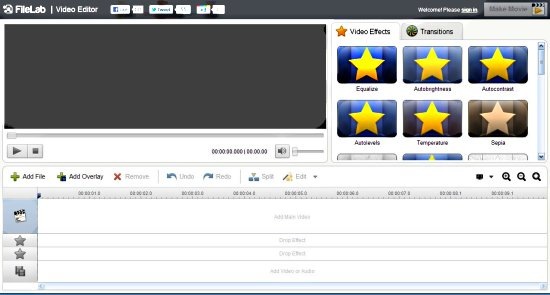
- Click on Add File to upload a video file.
- If you want to perform colour changes, then click on video effects.
- Click on transitions for providing various visual effects.
- Change the brightness, contrast or perform colour correction with Edit operation.
- After performing the video edit, you click on Make Movie to save it.
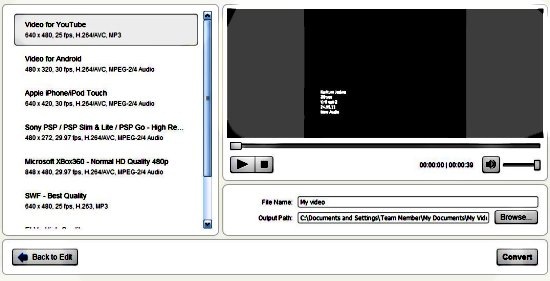
- You are transported to another page, where you have to specify the format you have to save the video in. Provide the name and the file location.
- Click on Convert.
That is it, all done. Now your converted video can be shared directly via Facebook or YouTube, or if you prefer to keep it to yourself then you can download it back to your computer.
Filelab Video Editor is a free web app which allows you to edit videos online. Edit Videos free online with Filelab Video Editor.
