PrivaZer is a free PC cleaner that helps you to clean memory of your PC and remove all the traces of internet browsing or application activities from your PC. This is a great, free system cleaning software for those who want to remove all the internet browsing history or application using activities from their PC.
Installing this free PC Cleaner
Downloading PrivaZer is as easy as most of the other user-friendly software download. You need to go to the link here and click on the download button to initiate this free security software. Once downloaded, the software has to be ‘Run’. When you click on ‘Run’ the process instructs for further proceedings following which the download completes. After having the free PC cleaner on your computer you just need to launch it through the shortcut. If you are interested to check out some more PC cleaning utility, you can try Weeny Free Cleaner, MindStick Cleaner and DiskMax.
Actions, Effects and Usage of Privazer
When you work on your computer at home or office, information about performed activities remains available in the memory in the form of digital clues and traces. Such traces of activities can lead to recovery of sensitive and confidential data or information which may lead to unwanted consequences. Knowing that there are recovery software available in the market which can efficiently track and decode such traces in the memory. This free security software has been developed to deep clean your computer memory to remove all such traceable digital evidences to help you confidently secure your computer, data and activities.
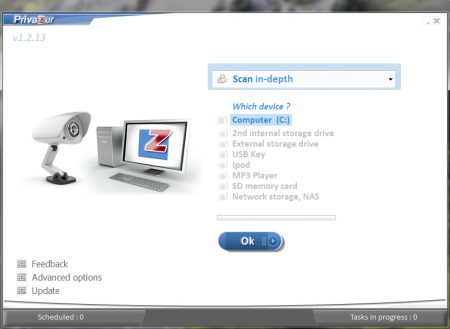
The main page of Privazer has a drop-down to select the action that you want to perform and a list below the drop-down has options to select which type of memory the actions has to be performed on.
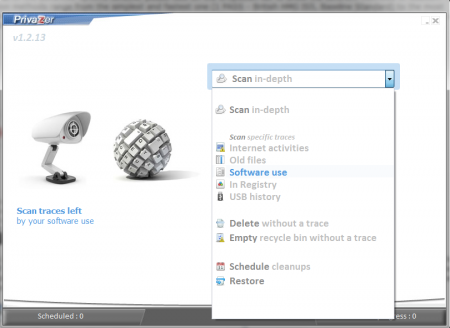
One may ‘Scan in-depth’ hard-disk drives of computers, external storage devices, music players, and SD memory cards by choosing appropriate options from the list. When the scan is run, a restore point can be created to restore the system to this juncture, if required in future. The traces in sensitive drives and directories can be ‘deleted without a trace’ by selecting the option from the drop-down. Once the files and directories are selected, cleaning can be started. It will remove all the selected files without leaving any traceable component of it on the computer. You can select the drives or files which you want to delete such that they cannot be recovered and click ‘start’ to begin the deletion process. Similarly one can ‘empty recycle bin’, schedule automatic ‘clean-ups’ and create ‘restore’ points for the computer. Restore points help to restore computers to its state at the selected juncture.
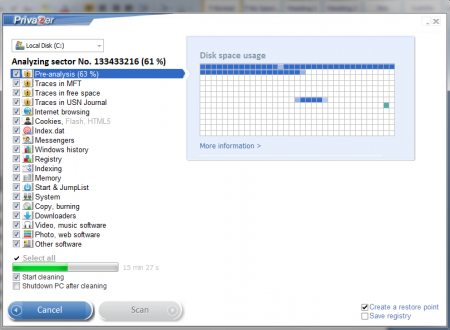
If people require to use more advanced options then PrivaZer has some of them too. Under Advance option one can choose to delete ‘pagefiles’ at the preferred time along with the option to send computer for ‘hibernation’ too. Moreover, PrivaZer allows deletion of Registry Back-ups as well. Also, one may allow PrivaZer to run as a background program or as a booster.
 PrivaZer is software loaded with features, each of which is of utmost significance in its task. For businesses which may be small but handle confidential data, no matter in what numbers, PrivaZer is the ultimate choice to have on the computer.
Besides, the functionality of the software, the back-up support available for it at the source website is immensely helpful too. The source is fairly intuitive with all the actions and features concisely yet clearly described everywhere necessary. Still, for anyone who requires additional help, the website efficiently answers every query with illustrative examples and denotations. The software can also be regularly updated if the owner wishes so. For update there is a separate option available at the PrivaZer window. Computer cleaning, security, timely updating and free availability makes PrivaZer a software to have on the PC.
