Toddler Keys is a free software that lets you lock keyboard, CD drive door and power-off button of you Computer. This easy to use tool restricts kids from messing up with PC by locking all your drives, the mouse, and the keyboard. The program can be set to run automatically when the computer is left idle for a specified time.
In addition, Toddler Key’s also lets you choose the sounds and images that your kid will use while accessing a keyboard. You can do this by creating a separate folder for your kid and just add the selected data to it.It display images and play sounds every time a key is pressed, preventing access to the desktop and applications. This adds some entertainment value for the kids as well. However, if you want to get off from the locked screen, type “QUIT” using your keyboard.
Here is how to download Toddler Keys:
- Go onto the website
- Click on

- Click on “Save as” and specify the download location
- Double click on the downloaded icon in order to run the program
- The installer will automatically installs the Toddler Keys Software as you follow up the instructions

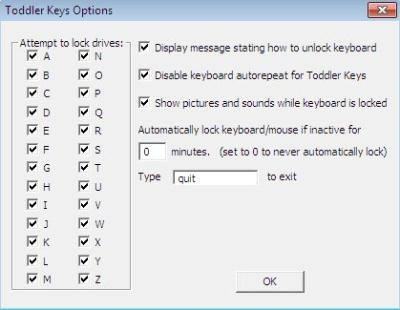
Now, you can look for the Toddler Key icon, like this: ,in your system tray. Right click on it and choose Manage Pictures and Sounds. This will allow you to add pictures or sounds that you want to be played when the Toddler Keys are on run. However, by clicking on “Options”, you will be taken to a pop-up bar that allows you to select the Keys you want to lock. You can take a look at the same pop-up bar in order to understand clearly:
If you are a parent and looking for some fun activities for your kids try out coloring software for kids, browser for kids, or language learning for kids.
In short, Toddler Keys is an extremely helpful software for parents who work from home and for others as well in order to save your computer from being harmed by anyone.
