• Home
  • Software Testing Service
  • About US
    • Privacy Policy
    • Disclosure
  • Write For Us
  • Submit Software
  • Contact Us
    • Subscribe
I Love Free Software
Best free software available all over the web. The free software categories include Windows Software, Social Networking Tools, and software installation videos.


  • Featured
  • Windows
  • Web Applications
  • App Store
  • Android
  • iPhone
  • iPad
  • Windows 8
  • Social Networking
  • Programming Tools

Facebook Chat Add-on for Firefox and Chrome: Facebook Chat Bully

By Deepika Arora on September 1, 2011 | Sponsored Links

Facebook Chat Bully is a free add-on for firefox and chrome to control the settings of Facebook chat. If you do alterations in chat bully, the result will be shown onto your Facebook account. Let’s check out some of the features it offers to understand it in a more effective way:

  • Cache all chat components
  • Cache the chat panel given at the left column. This panel is visible whenever you minimize the slide-bar.
  • Cache all avatars given at the sidebar
  • Cache status icon given at the sidebar

However, in order to get access to these available features, you need to install Facebook Chat Bully app.

Here is how to download Facebook Chat Bully:

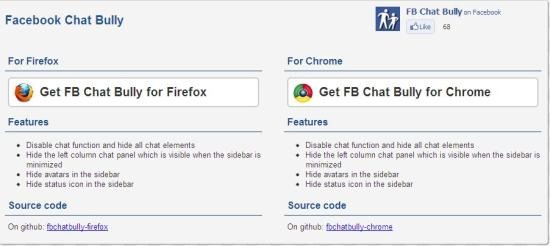
  • On the website, you will find two options- Get Facebook Chat Bully for Firefox and the other one for Chrome. You can take a look at below given image to understand it better:
FB
Sponsored Links

  • I did it with Chrome. Click on “Get FB Chat Bully for Chrome”
  • Click on “Ok”
  • Click on the downloaded icon
  • Click on “Install”
  • Now, you can manage your installed Extensions by clicking Extensions in the “Tools Menu”.
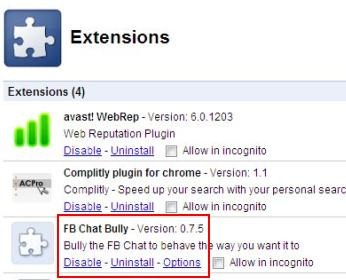
  • Clicking on “Extensions” given in the Tools Menu will take you to the Extensions Page. On the FB Chat Bully,  you need to click on “Options”  as shown below:
FB5

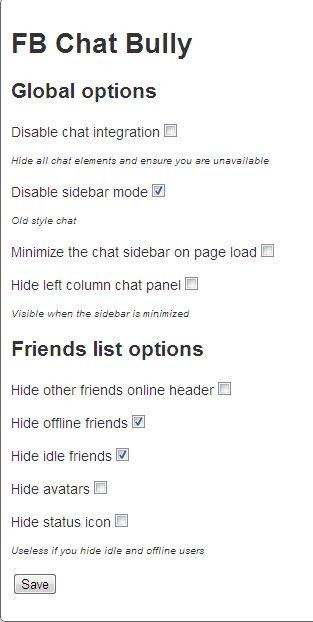
  • This will take you to the FB Chat Bully page. You can take a look at my FB chat Bully Window in order to get familiar with it:
FB4

You can also try other Facebook applications like fTalk, Social Hangouts and Hoot.me reviewed by us.

On this screen just click on the options you want to activate and finally click on “Save”. The result of all these settings can then be seen in your Facebook account.

In short, Facebook Chat Bully is a fun web tool to change the settings of Facebook chat. So if you are a Facebook fan go ahead and get it right away.

Home Page: Click Here
Works With: Firefox and Chrome
Free / Paid: Free

Link to This Page:


You Might Also Like:

  1. Fastest Facebook: Facebook Plugin For Firefox
  2. Facebook Chat Status Notifier Firefox Plugin for Facebook Users
  3. FBChatSeenBlocker To Remove Facebook Chat “Seen” Notification
  4. Block Facebook Chat Message Seen Notification: Chat Undetected
  5. Social Plus Facebook Extension for Firefox, Chrome and Safari

Be the first to know about Latest Free Software:

  • Join us on Facebook
  • Subscribe to our RSS Feed
  • Follow us on Twitter
  • Subscribe to Email Updates:

Posted in Facebook tools, Plugins, Social Networking | Tagged bully, Facebook Chat Bully, firefox | Leave a response

Deepika Arora

« Previous Next »

Featured Posts

  • 5 Free Snippet Managers To Manage Code Snippets
  • 5 Free Online Tools To Test Website In Different Resolutions
  • 5 Free Microsoft Access Alternatives
  • 5 Free IP Notifier Apps
  • 5 Online Mapping Websites
  • 5 Free Alternatives To iGoogle
  • 7 Websites To Download Windows 8 Themes
  • 5 Best Free Calculator Apps For Windows 8

Join More than 15,000 Followers!

Enter your Email Address
  • Submit Software
  • Software Testing Service
  • Write For Us
  • About Us
  • Privacy Policy
  • Disclosure
  • Contact Us

Link to Us:

Did we review your software here? Feel free to flaunt this badge on your website:

Free Software

Use this Code:

Copyright © 2013 I Love Free Software.

Powered by WordPress and Hybrid. New - H