Kool Media Converter is a respite for those of us who have our music files stored in a plethora of various formats such as FLAC, AAC, MP3, MP4, etc. It can convert any audio file into another format that the user chooses. Atleast that is what it looks like on paper. Let us see if this is actually the case.
Features of this media converter
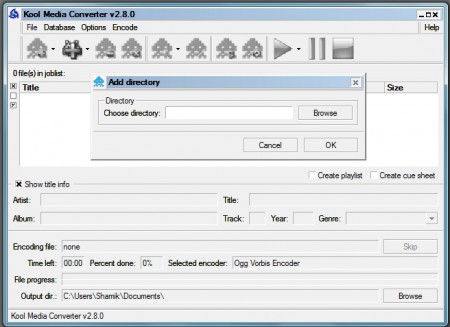
The application boasts of a number of features. It has a number of encoding options to convert your files from one format to another. It can recognize audio files in formats like FLAC, AAC, AINC, BONK, OGG etc. A number of these file formats are pretty uncommon and most players don’t play or recognize these formats. This application, however, can do both. It can play the files as well as convert them. There is an option wherein the users can rip audio files from audio CDs so that they can be played on any portable music player. There’s an option called CDDB which can be enabled. This allows the application to download information about the audio disc from the internet and modify the ID3 tags associated with the file to reflect more data. The user can edit the tags on their own as well using the in-built tag editor. One of the glaring omissions from the feature list is the lack of MP3 playback. Considering that it is quite possibly the most popular audio format used today, it should have definitely been included in the application
Downloading and Installation
The version reviewed here is Kool Media Converter 2.8.0.0. It is about 5.7 MB in size. Downloading is quite fast from their servers. Installation isn’t the quickest out there and there are much larger programs which install faster. One annoying thing about the installation is that it prompts the user to download and install a program that is a toolbar for browsers. This hampers the smooth running of the installation procedure. Another annoying thing is that the installer closes all browser windows that might be open. Whereas other programs prompt the user to save their work and then close the browser, this program assumes that there isn’t anything more important at that point in time. This can be very annoying.
Working and Interface of this media converter
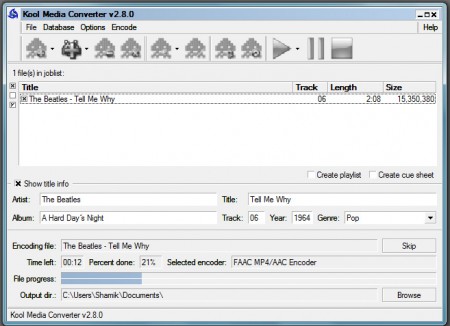
Once installed, the program works smoothly enough. The interface isn’t the best out there, but it is legible and works without much problem. Encoding is quite fast, but the buttons and controls could be a bit easier to use. The dialog boxes and user prompts also need a little work. On the functionality front, all seems to be well. Results are quick and satisfactory, but the absence of MP3 playback is still a worry.
To convert a file, one needs to simply open the file by navigating to the required directory in the prompt. Once that is done, the output format needs to be specified. After doing that, all the user has to do is hit the play button, which starts the conversion.
Verdict
There are more effective media converters available on the internet and they do a better job of many things without any of the glaring drawbacks of Kool Media Converter. As it turns out, the application is ‘Kool’ only in name and needs a lot more work before it actually becomes so.
