Keyboard Lock is a free software to lock keyboard and mouse of your computer. This free software totally locks your keyboard and mouse and makes all the opened applications visible, as it does not affect the display. This is a perfect software to use if you are watching some movie on your computer, and do not want your kid to fiddle around with the keyboard.
This keyboard lock software gives you the option to enter password to lock and unlock the keyboard.
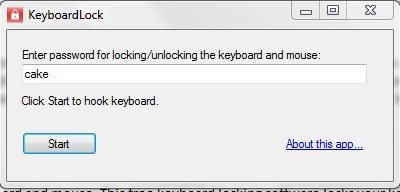
Keyboard lock software has got a small and straight-forward interface that includes a password box and start button. For using this keyboard lock software, you need to enter a password in the password box and click the start button for starting the keyboard lock process.
For unlocking, you need to simply retype the password anywhere on the screen.
Also, check out free software to increase download speed.
Some Key Features Of Keyboard Lock Freeware:
- Basic and straight-forward interface.
- Small in size tool, so takes very less space of your hard drive.
- Lock or unlock the keyboard and mouse just by entering the password.
- Can be easily used by even the new users.
- No installation required.
You would also like to check out free video converter software.
How To Get Started With Keyboard Lock:
- Open the homepage of Keyboard Lock and click the Download button.
- A Zip file of Keyboard Lock gets downloaded into your system.
- Unzip the zip format file and run the application file.
- The software will open up.
- Enter a password in the password box.
- Click the start button.
- Now, type the password anywhere on the screen for locking the keyboard and mouse.
Keyboard Lock offers one of the easiest way to lock keyboard and mouse using the password. Click here to download Keyboard Lock.
