StrokeIt is a free mouse gesture recognition software that let’s you control programs on your computer using mouse gestures. This free mouse gesture recognition software is lightweight and resides in the system tray of your computer.
For drawing a gesture, you need to right click the mouse and hold down, then draw the mouse gesture by moving the mouse in the desired direction. In addition, you are allowed to disable this free software with a singe right click on it’s system tray icon.
StrokeIt displays a command editor window with a list of default applications and gestures assigned to them, so you can use any of the pre-assigned mouse gesture to test whether it is resulting in the action associated with it or not.
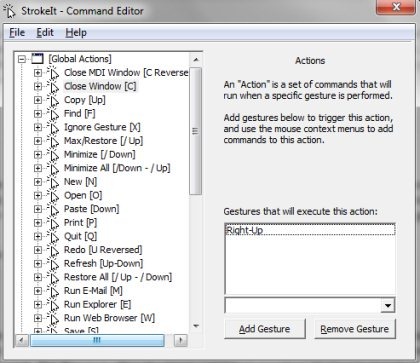
The command Editor window basically lets you you add new applications, new commands, and new actions to this mouse gesture recognition program. So this way, you can control programs and perform several tasks on your computer by drawing mouse gestures.
StrokeIt is free for personal use, so try this mouse gesture recognition software for free. You may also try out some other mouse gesture recognition software like gMote, Just Gestures, Mouse Wrangler.
Features Of This Mouse Gesture Recognition software:
- Comes with default applications and pre-set actions.
- Add new applications, commands and actions.
- Small in size mouse gesture software.
- Disable the software with a single right click.
- Cancel a mouse gesture drawn with a left click.
- Works from your system tray.
- Comes with mouse gestures to perform global actions.
- Comes with a learning mode to teach you.
How To Use This Mouse Gesture Recognition Software:
- Launch this free software.
- Left click the system tray icon of StrokeIt to open the command editor window.
- Command Editor window is a place wherein, you can customize this software to work according to your preference.
- Click and hold down the right mouse button and draw the gesture.
- This tool will recognize the gesture drawn and performs the action associated with the gesture.
StrokeIt saves your time and makes your work easier by allowing you to draw mouse gesture to automatically perform certain actions. Download StrokeIt for free.
