Windows 8 Transformation Pack is a free software to get Windows 8 UI on Windows 7, Windows Vista, Windows XP, and Windows Server. This transformation pack basically transforms your default Windows version UI to Windows 8 UI that includes a Charms bar or Metro UI as in Windows 8.
This transformation pack is suitable for Windows Vista, XP and server. If you are using a Windows 7 PC, then I would suggest you to use Windows 8 UX Pack reviewed by us, as it is specially designed for Windows 7, and gives a better experience.
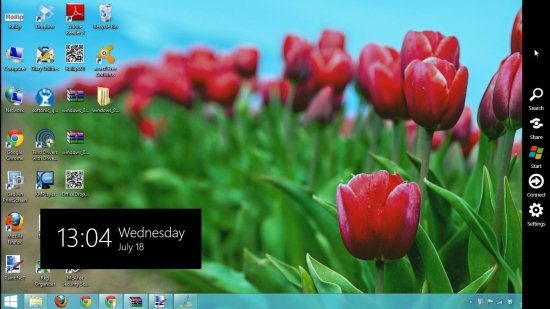
Coming back to Windows 8 Transformation Pack, it gives a complete look and feel of Windows 8 to your existing Windows version by adding the Charms bar to the interface.
While installing this software, you can choose the Immerse UI between Metro UI Desktop or Charms bar that appears in the same way as it appears in Windows 8 by moving and placing the mouse cursor on top right or bottom right corner of the screen.
The Lock screen that appears when you lock Windows also gives a complete feel of Windows 8.
You will also come across a new start menu button after installing this transformation pack.
Don’t forget to check out Mosaic reviewed by us.
Features Of This Tool To Get Windows 8 UI:
- Transforms your earlier Windows version and gives it a Windows 8 UI.
- Charms bar appear on the interface in the same way, as it appears in Windows 8.
- Easy installation process.
- Replaced Windows Vista theme, Windows 7 theme, Windows 7 Metro Theme with M-Awesome’s Windows 8 RC and with panda-x’s Windows 8 RC Aero.
- Displays Loading circle animation present in Windows 8 Release preview.
- Updated lock screen of Windows 8 release preview gives you a complete feel.
- Choose the Immersive UI between Charms bar and Metro UI Desktop.
- Choose Windows 8 feature like Aero frame UI, taskbar’s user tile, Aero’s auto-colorization, etc.
How To Download And Install This Tool To Get Windows 8 UI:
- Open the homepage of this free tool and hit the download button.
- A zip file of this transformation pack will be downloaded to your system.
- Unzip the zip files and run the application file of this transformation pack.
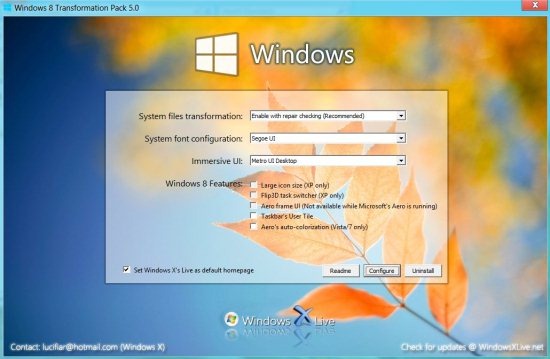
- You will come across an installation window.
- Let the system file transformation and system font configuration options remain the default.
- Choose the Immersive UI between Charms bar and Metro UI Desktop.
- Choose Windows 8 features from the available features.
- Now, you need to click the Installbutton.
- Wait for a while for this tool to apply settings.
- It will ask you for a Reboot, so reboot your system and there you are on Windows 8 UI.
Windows 8 Transformation Pack 5.0 offers an effortless way to experience Windows 8 on earlier Windows version. Download Windows 8 Transformation Pack free.
