Facebook has become the world’s largest social networking website and in some or the other way we have become addicted to Facebook. From sharing links to crazy funny photos, we have actually started living in a virtual world of sharing Data. All thanks to Mark Zuckerberg.
However, there are always chances that your Facebook Account gets deleted, either you delete it accidentally or somebody else hacks your account out of anger or just for fun. Ultimately, you lose all your important data. Hence, a “Backup” is extensively required to retrieve your profile if you get into some pathetic mess. Let’s check out the Backup service that Facebook comes up with.
How To Take Backup of Facebook Data:
- Log-in to your Facebook Account
- Click on “drop-down” menu available next to Quick help icon and select “Settings” option.
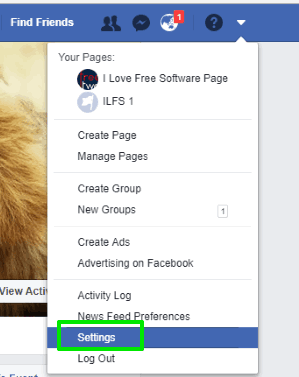
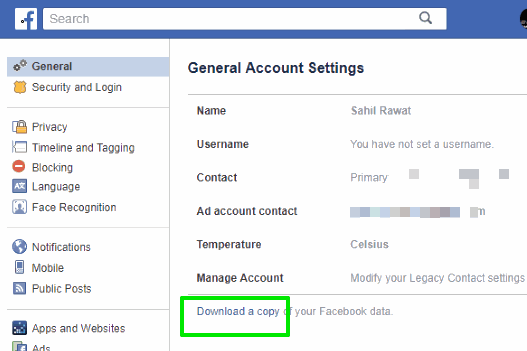
- Settings Page opens with General menu. There you will see “Download a Copy of your Facebook Data”. Click on that option.
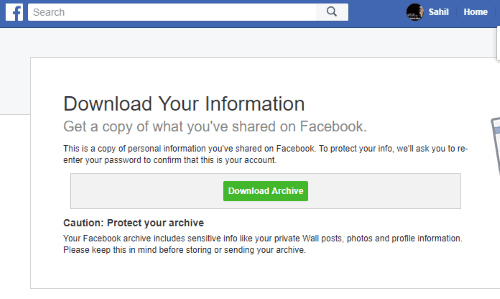
- A pop-up notification window will open where you will see “Download Archive” button. Use that button and then it will prompt you to enter your Facebook password for confirmation.
- Facebook will start creating your archive. You will receive a download link in your Facebook email account whenever your archive will get ready.
- As soon as you receive an email, click on that link, and it will jump you to Facebook account under General menu in Settings. There, you can click on Download Archive button again, enter your Facebook password and finally you can save the zip archive to download your Facebook data.
- Open up the index.html located in the zipped file in your web browser and browse through your Facebook content.
Yup..its done. You have backed up all your Facebook Profile Data that you have so far. However, it’s always good to back up your Facebook data at regular intervals. Go ahead and start backing up your Facebook Data right away!!
