BlitzBlank is a free malware remover to be used by professionals and expert users. This free malware remover is especially targeted towards those malware that are difficult to delete by other anti-malware software. In such case, you can use BlitzBlank malware remover tool to delete those malware. BlitzBlank works by removing malware and other software during boot process of Windows. Before anything else is loaded, BlitzBlank deletes the malware, so that malware does not gets an opportunity to execute some command which makes it difficult to remove once PC has booted up. For a home user, you can try tools like Comodo BOClean, and Malwarebytes Anti-Malware.
We all know the story, viruses, spyware, malware and other intrusive programs are sometimes accidentally downloaded and remain in the system indefinitely. With BlitzBlank malware, at least, will be banished from your computer. Malware is indeed a difficult thing to get ride of but this free tool removes it completely. You’ll be surprised and just how effective it is. But as we mentioned earlier, BlitzBlank should be used by professional users only, as you have to manually specify which files or registry entries you want to delete. BlitzBlank will not find malware, it can just delete those based on input provided by you.
Malware, as most of you know, can get inside files and “hide” from detection; often copying itself into other files and thus renewing its life should one version be discovered. BlitzBlank kills and deletes malware during the computer’s boot process (this apparently is the only time).
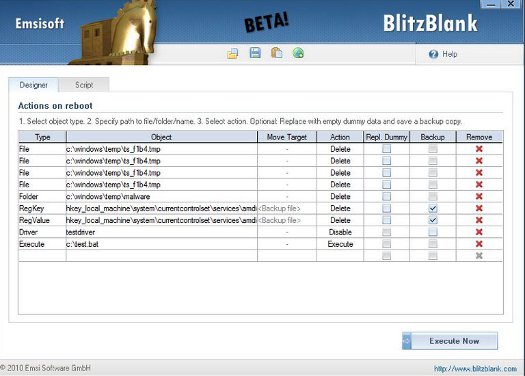
Some of the features of BlitzBlank malware remover:
- BlitzBlank scans your computer during the starting process and analyses the boot up files and folders.
- If the program detects malware or files that seem out of place or strange, users receive a report and asked whether action should be taken.
- The easily navigated interface clearly shows you which files or folders have malware and which files or folders suspected of containing foreign programs.
- Suspected files and folders are quarantined until you, the user, decide what to do.
- Users are also able to write their own scripts and for those unsure of what this entails, a support service is available.
As you have now no doubt ascertained, BlitzBlank is not the sort of program that users can just click the execute button and let the program do its thing. This is why experience computer operators or computer engineers should only use this free malware remover.
If the utility is not used correctly there is a chance that your computer’s OS may be compromised and thus cause you unwanted stress. If you feel confident and have experience, then using this utility will save you hours of frustration and, if used correctly, BlitzBlank will keep your computer system safe; protecting it from the horrors of malware. Download Blitzblank here.
