Fiesta.cc is a free web application to create email group to send group email. You can add members to email groups, and create private mailing lists. You can specify members of your group, and create as many mailing groups as you want. Once your email group is created, you can send group mails to them. All the members of the group can manage the mailing list.
Fiesta.cc is an online email group creator, and does not needs any download or installation. It is completely free private mailing list creator.
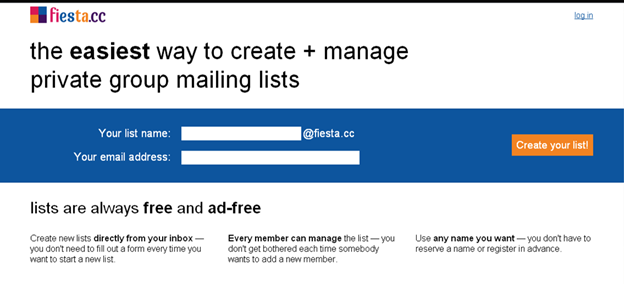
Features of this Free Email Group Creator:
- It is free for use and is also ad-free. So no more you have to see those unbearable ads on your mailing list.
- It creates an online mailing list.
- It defines different names for different mailing lists. Therefore if you want to organize the names of your relatives and keep them aside from that of your friends you can easily do that.
- All the messages that you send are also remembered with this mailing list. It also gives you an option to save a copy of all the messages that you send.
- Another new feature that is added on fiesta.cc is that you can create your custom domain, which is not quite found in these types of mailing software.
Also check out Group SMS software, and Free Conference Call software.
How to Create Email Group:
- Firstly, you have to go to the following website: www.fiesta.cc
- Next you have to create a mailing list name and also add an email address where the confirmation mail will be sent.
- You will then be asked to add a few email addresses whom you want to add to the mailing list. Once you do that and click on submit button the confirmation mail will be sent.

- When you click on the confirmation link you will be directed to the dashboard page on fiesta.cc and there you can manage your mailing list and can add more names.

- You can also go to settings page to change the preferences and also if you want to add a fiesta.cc custom domain.

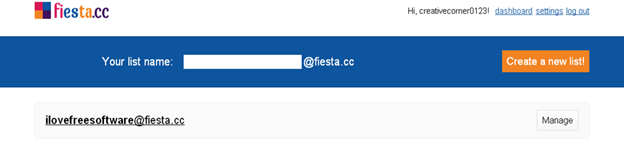
Fiesta.cc is totally free and this is one reason that it can be tried out by those who want to keep a clean and segregated mailing lists. It is one of the easiest ways to create mail groups, and send group emails.