World Clock, from the name itself, it’s clear that this is a free world clock software which shows you the current time of different places across the world. This free world clock software is small in size and displays the time of different places in the same interface. This free world clock resides in your system tray and works from your system tray itself. Double click the system tray icon for viewing the time in a small interface or right click the system tray icon for other options.
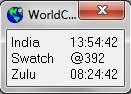
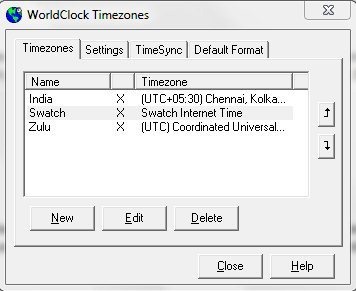
This free world clock software enables you to add any number of time zones to itself, you can even arrange their order in which they will be displayed in the main interface. Time zones in the time zone list can be edited or deleted using the respective options. World clock even allows you to customize or change the font, font style and font size according to your preference. World clock comes with a convert option, which basically allows you to compare time in different time zones effortlessly.
Don’t miss to read free Weather software reviewed by us.
Some Key Features Of World Clock:
- Totally free and easy to use.
- Add any number of time zones.
- View current time of multiple locations in one single interface.
- Change the font, font style and font size.
- Time format can be changed.
- Straight-forward and small interface.
- Small in size, so takes very less space on your hard drive.
- Compare time in 2 different time zones using “Convert” option.
- Can be used to synchronize time with atomic clock.
You would also like to check out free software to arrange photos.
How To Download And Install World Clock:
- Open the homepage of World Clock and click the Download link “World clock”.
- An exe file of World Clock gets downloaded into your system.
- Run the exe file and follow further installation instructions.
World clock is a an awesome clock software which straight-forwardly displays the current time of different places around the world. Click here to download World clock for free.
