Cool Timer is a free timer software which allow users to set wake up alarms or allows them to simply use it as a countdown timer or a stopwatch. This timer software basically includes 3 modes of functionality which are countdown, wake up and stopwatch. So you can easily switch between these modes and use any of these modes in the same interface. Wake up mode basically serves as an alarm clock and wakes you up from sleep. Cool Timer is basically a 99 hour timer that allows you to set countdown timer to a maximum of 99 hours.
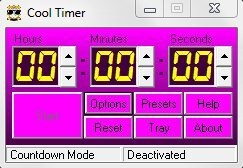
This timer software has got a small and straight-forward user-interface which can be customized, as you can change the skin color as well as the colors on digits and buttons. This free timer software includes few pre-installed alarm sounds or you can even add any of your favorite sound file in formats like WAV, MP3 or MIDI to this software. Add your favorite sound file in any of these supported formats, and use it as your alarm sound.
You can even add message to your alarms, so when the alarm rings up, it displays the message entered by you in that particular alarm. This timer software is lightweight and lets you choose between small and big window size, by default it comes with a small sized Window, if you prefer big sized window simply switch to it from options button. Try cool Timer for free.
Also, check out free software to animate pictures.
Some Key Features Of This Free Timer Software:
- Use it as alarm clock, countdown timer or stopwatch.
- Add your favorite sound files, and use them as alarm tone.
- Supports sound file formats like MP3, WAV, MIDI.
- Change the color of buttons, background and digits.
- Add message to alarm.
- User friendly and simple interface.
- Choose the window size between small and big.
- Minimize to tray with respective button.
You would also like to check out free software to watch TV on PC.
How To Download And Install this Free Timer software:
- Open the homepage of this free timer software and click the “Download” button.
- An exe file of Cool Timer will be downloaded into your system.
- Run the exe file and follow further instructions of installation.
Cool Timer is a smart software which can be used as a countdown timer, alarm clock or as a stopwatch on your system. Download Cool Timer for free.
