Free Desktop Timer is a totally free timer software for your desktop which helps to set alarms in few clicks. As you launch this free timer software, it sits in your system tray and works from your system tray itself. This free timer software even allows you to set the timer and schedule activities like computer shutdown, hibernate and stand by. It comes with a digital clock like interface which shows hours, minutes and seconds in one single interface.
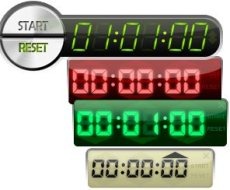
This free timer software allows you to set unlimited number of timers on your computer. For setting the timer, you need to click the upside arrow of hours, minutes and seconds, adjust the time and click the start button. Once you click the start button, it starts the countdown for your specified time, and when the countdown hits Zero, the alarms rings up. For stopping the alarm sound, you need to click on the timer only once. Free Desktop Timer comes with few pre-installed skins, so choose your preferred skin from the available skins.
Free desktop Timer do not offer a wide range of alarm tones, so you don’t have enough choice in alarm tones. It only offers 3 alarm tones, so you can select any of your preferred alarm tones. Try Free Desktop Timer for free.
You would also like to check out free software to get deleted files back.
Some Key Features Of Free Desktop Timer software:
- Small in size and easy to use.
- Set any number of timers.
- Choose your preferred skin from the available skins.
- Set timer for automatic computer shutdown, hibernate or stand by.
- “On Top” option to keep the timer always on top.
- Reset timer with a single click.
Don’t miss to check out free software to increase computer speed.
How To Download And Install Free Desktop Timer Software:
- Go on to the homepage of Free Desktop Timer.
- Click any of the download link among the Zip or exe download link.
- If you click the exe download link, an exe file will be downloaded into your system.
- Run the exe file and go along with further instructions for installation.
Free Desktop Timer is a very basic and straight-forward timer software to set alarms. You can set wake up alarms or just set reminder alarms for completing a task. Download Free Desktop Timer for free.
