Ghostery is a free security extension for your browser which gives your privacy back in your hands. Its absolutely free to download and use.
Are you really aware that thousands of companies track what searches you make, gather your usage statistics and auction them for money? Yes this happens frequently. You can prevent all of them by using Ghostery! It is a free extension for your browser which is capable of tracking all those networks which are tracking you and can block them. Hence it protects your privacy!
How to use Ghostery?
Ghostery is a very simple and compact extension for your browser. Just download it for free and add it to your browser list of extensions. It is ready to work for you to protect you and your data. As soon as you visit any site Ghostery icon turns blue and it tracks the site to see the presence of any such networks. If found Ghostery blocks them immediately and a number indicating the number of companies it has blocked appears below the Ghostery icon. A momentary purple box appears at the top right corner of your browser displaying the names of companies that are blocked. Additional information about those companies can also be learnt by clicking the Ghostery icon.

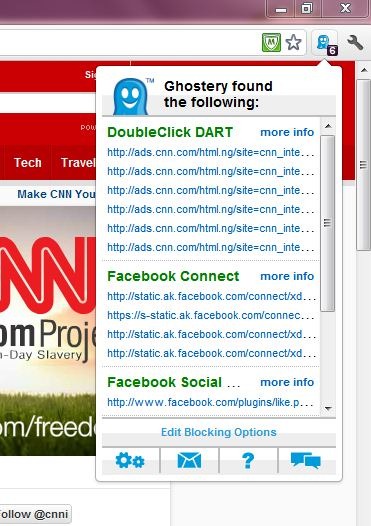
Don’t forget to turn on automatic blocking because only when it is turned on, Ghostery can block the trackers else it will just show you the list of trackers in that site. Ghostery offers another feature called GhostRank and if it is enabled it sends only the details of new trackers found in the websites you visit (and not your personal information) to Ghostery team so that it can be updated.
Customize Ghostery to your choice:
Ghostery provides an array of customizations. Some of them are:
- You can turn on or off automatic blocking.
- You can turn on or off GhostRank.
- You can turn on or off the purple box and can customize where it appears and how long it appears.
- You can unblock a blocked site.
- You can turn on or off the bug script sources.
- You can turn on or off auto updates.
Compatibility of Ghostery
Ghostery is compatible with the following browsers:
- Mozilla Firefox
- Safari
- Google Chrome
- Opera
- Internet Explorer
Ghostery extension installs smoothly and works fine. When put to use it gave good results without any problems being reported. It is an extension that every browser must be equipped with to stay protected! Is your browser equipped with Ghostery? If not download Ghostery and use it for free and stay free from your security worries!
