Gmail Meter is a free tool which allows you to check Gmail statistics, like how many emails do you actually read? How quickly you respond to the emails. These tasks were much difficult to figure out. For this purpose Google launched Gmail meter, which made it easy to check Gmail Statistics.
Google offers this excellent service for its Gmail users for free. Now you can also track how many emails you send or receive in a month, week or year and many other such parameters can be tracked.
Gmail meter also provides different statistics on your Gmail account, which helps you to understand your Gmail habits better.
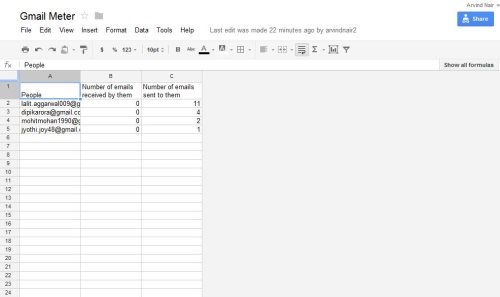
On launching Gmail meter, you get to see two different options, the first option creates the monthly report and the second option allows you to create reports for specific period of time like for a week, for 2 weeks, a month or for complete year.
Gmail meter provides you variety of Gmail statistics that helps you to examine your own Gmail habits.
You can also check out how to enable smart labels in Gmail reviewed by us.
Lets check the important features of Gmail Meter.
Key Features Of This Tool To Check Gmail Statistics:
- Volume Statistics shows the number of starred and important messages, it also shows the number of mails received.
- Volume statistics also determines, how you are using email efficiency tools like the main priority box.
- Daily traffic allows you to track the estimate of sent and received messages during a given period.
- Traffic pattern lets you to track overall email activity for past weeks.
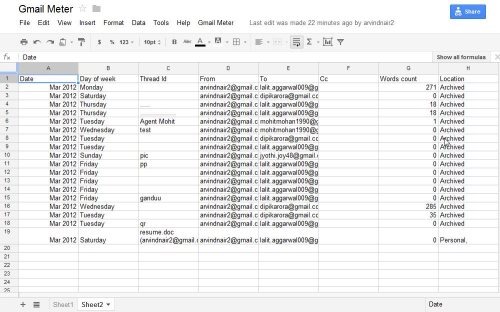
- Email categories show you how you manage your inbox.
- Shows the number of word count whether it exceeds or not.
- Shows the participation in lengthy conversations.
- Tracks the time taken to reply and how much others take to reply back.
How To Setup Gmail Statistics Meter:
- Visit Google Docs.
- Create a spread sheet and name it as Gmail Meter.
- Then click “Tools” and select “Script Gallery”
- Now, look for Gmail meter, click on install.
- You will be asked to authorize this app. Click on Authorize.
- Then Gmail Meter will ask access to your email account and calendar. Click grant access.
- Gmail Meter would now be installed. Close the Script Gallery window now.
- A small Gmail Meter link will appear at the top of your spreadsheet.
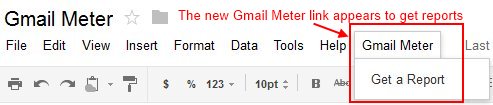
- Click the Gmail Meter link, then you get the option of “Get a Report”.
- From here you can choose the type of report you want i.e. monthly or custom. Then click on Get it button.
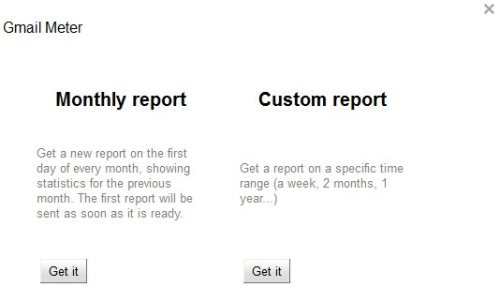
- Preparing report might take a few minutes, you will receive an email once the report is ready.
In short, Gmail Meter is a nice tool to track statistics of your Gmail account. Go ahead and try out yourself…!
