BExplorer also better known as better explorer provides tabbed windows file browsing. It is a replacement of standard windows explorer with additional features which makes its work more convenient. One of its features is addition of tabs in explorer, additional toolbars and many more. Some other free file explorers we reviewed earlier include CubicExplorer, and SE-Explorer.
BExplorer is mainly designed for the use of windows 7. Its interface provides with tab functionality and glassy view. It helps in changing of library icons, file operations, synchronized command prompt, folder icons may be changed, extended jump list support in windows 7, double panel explorer and many more. BExplorer works well with windows vista, for it to work on windows 7, aero feature must be on. Additionally there is a need of dot net framework.
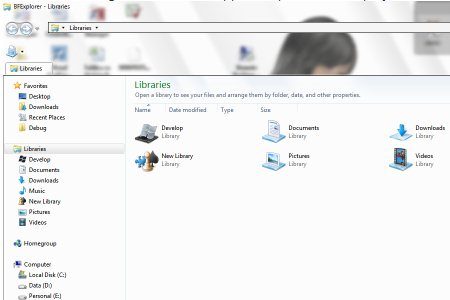
BExplorer is a simple to use software and has right balance of simplicity and full functionality. With it you can open multiple windows explorer windows in tabs under single BExplorer window. There is no need to switch file browser, all library and customization that you have applied to your windows explorer are available within the BExplorer. The utilities just bear a file size of about 1.5 MB use.
Also Check out: Free Replacements for Windows Explorer.
The mains features of BExplorer are:
- It adds tab functionality together with use of standard explorer browser control.
- It can add additional toolbar and makes its use more by several features like.
- Changing library icons.
- File operations with files and folders and an interactive graphical user interface.
- It has a synchronized command prompt which makes it more efficient.
- It can change folder icons for flexibility.
- It has an extended jump list support that provides its use simple.
- Glassy view and double panel explorer.
- Extended search like extended search pane in vista and windows 7.
When you download BExplorer you are provided with some of its added functionality like added toolbar in glass area, added view selection button, added library tools button, can create library and can change library icons, added menu to tabs, removed command bars, fixed exception if try to remove only one tab at a time, stability and performance fixes and many more.
So overall BExplorer provides an alternative to windows explorer, and provides features of tab browsing. It is easy to use and efficient in working. It has a flexible interface which makes the work more convenient.
So be fast in choosing BExplorer an alternative for Windows Vista and Windows 7 and check the full functionality of this software. You might also like iPhone Windows Explorer.
