JaxtrSMS is a free Android app to send free SMS worldwide. With this app you can send SMS to any number within the country and any international number as well. JaxtrSMS lets you use your current number and allows you to send free SMS’s to you entire phonebook. All you need to do is register your number with this service. The best part is that the person you are sending a SMS to is not required to have this application installed on their phones.

Features of JaxtrSMS:
- Free to download.
- Send free SMS to any number worldwide.
- Integrated with your phonebook.
- The recipient is not required to have JaxtrSMS installed in their device.
- Works with WiFi as well as network coverage.
How to download JaxtrSMS:
- Go to the Android Market. Or scan the QR code given below.

- Click on search tab and search for “JaxtrSMS”.
- Once found click on the application.
- On the application page, click on install.
- That is it the application will get downloaded in your Android device.

Once downloaded, open the app by clicking on it. It will show the registration page as shown below.
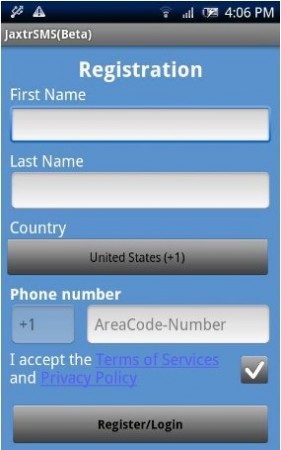
Enter your name and phone number. It will automatically detect the country for you. Click on the check box to accept the terms and conditions. Then click the “Register/Login” button. For a brief moment the screen will show a message that the number is being verified. Then you will receive a confirmation message from JaxtrSMS, that you have been registered. All done. Now you can send free SMS to anybody in your phonebook.
How to send free SMS:
- After receiving the confirmation message, now all you need to do is click on the New Message tab at the top of the screen.
- Add the number of the receiver, either by typing or selecting from your phonebook. This app is automatically integrated with your phonebook. To select contacts from phonebook click on the Add button next to the phone number box.
- After selecting the number, compose your message.
- Then hit send.
I tried this application out, by sending SMS to a lot of my friends and everybody received the SMS in no time. Here is a screenshot of my JaxtrSMS inbox:

JaxtrSMS is a great app for sending free SMS all over the world and save yourself some money. Give this app a try and I’m sure you will not be disappointed.
