• Home
  • Software Testing Service
  • About US
    • Privacy Policy
    • Disclosure
  • Write For Us
  • Submit Software
  • Contact Us
    • Subscribe
I Love Free Software
Best free software available all over the web. The free software categories include Windows Software, Social Networking Tools, and software installation videos.


  • Featured
  • Windows
  • Web Applications
  • App Store
  • Android
  • iPhone
  • iPad
  • Windows 8
  • Social Networking
  • Programming Tools

ISO to USB: Burn ISO Files Directly on USB

By Tushar on September 22, 2011 | Sponsored Links

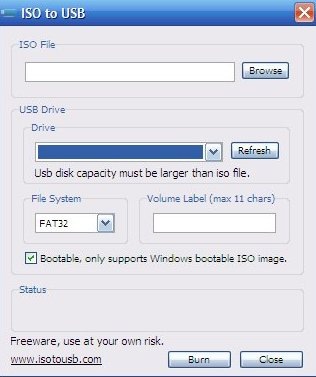
ISO to USB is a free software which burns ISO files directly to USB drives like memory sticks or flash drives. ISO to USB is a compact software which could also create a bootable USB disk with a Windows OS. Though the ISO format is very popular for CDs/DVDs, now it can be carried anywhere with ease with ISO to USB. For the non technical readers ISO is a file format which is specifically created to be burnt on a secondary storage device. Whenever you want to copy a file on CD/DVD, it is essentially converted into the ISO format.
isotousb1
Sponsored Links

The biggest convenience with ISO to USB is that you don’t need any ISO converters to transfer it to your USB.

How ISO to USB works :

ISO to USB is a free burning software. It’s basic function is to burn ISO files on a storage device. While there are ample software for your CD, they are still rare for the USB drives. USB drives are portable and with the advent of USB devices, this kind of file burning software comes in both as a necessity and an alternate to the CD/DVD. ISO to USB comes in handy as you don’t have to sweat it out, just download this software, choose the ISO file you want to burn on a USB and click on Burn. Abracadabra you burned ISO to USB. You could also transfer your bootable disk to the USB drive.

Features of ISO to USB :

  • Free, this utility software is completely free.
  • Compact, it doesn’t gobble much of your disk space.
  • Works on multiple Devices, If you have a USB port on your storage device then you could store the ISO files over them.
  • Easy to work with, ISO to USB is easy to use.

How to Download ISO to USB :

  • Go to the website.
  • Click on Download now.
  • After the download, launch the software.
  • Browse on the files you want to burn on the USB Drive. Select the destination drive.
  • Click on Burn.

ISO to USB is a very useful software, which burns ISO to USB. Go ahead and give it a try.

Home Page: Click Here
Works With: Windows XP, Windows 7
Free / Paid: Free

Link to This Page:


You Might Also Like:

  1. Create, Convert, Mount And Burn ISO Image Files Using ISO Toolkit
  2. Burn4Free: Free Software to Burn CD/DVD
  3. CDBurner XP: Burn CD/DVD/Blu-Ray Free
  4. BurnAware Free: Free Software to Burn Blu-Ray Discs
  5. Write ISO to USB: ImageUSB

Be the first to know about Latest Free Software:

  • Join us on Facebook
  • Subscribe to our RSS Feed
  • Follow us on Twitter
  • Subscribe to Email Updates:

Posted in CD/DVD Burners | Tagged burn iso, burning software, compact software, flash drives, free burning software, ISO, iso file, iso format, memory sticks, USB, usb drive | Leave a response

Tushar

« Previous Next »

Featured Posts

  • Top 7 Free Launchers for Android
  • 5 Free Snippet Managers To Manage Code Snippets
  • 5 Free Online Tools To Test Website In Different Resolutions
  • 5 Free Microsoft Access Alternatives
  • 5 Free IP Notifier Apps
  • 5 Online Mapping Websites
  • 5 Free Alternatives To iGoogle
  • 7 Websites To Download Windows 8 Themes

Join More than 15,000 Followers!

Enter your Email Address
  • Submit Software
  • Software Testing Service
  • Write For Us
  • About Us
  • Privacy Policy
  • Disclosure
  • Contact Us

Link to Us:

Did we review your software here? Feel free to flaunt this badge on your website:

Free Software

Use this Code:

Copyright © 2013 I Love Free Software.

Powered by WordPress and Hybrid. New - H