Google shortcuts is a Google shortcut extension that makes your internet activities that much easier. It is a free plugin for Chrome and Firefox that next to the address bar on both Chrome and Firefox browsers and consists of a list of all Google services as either buttons or a drop-down menu. You can easily access any Google service by using this Google shortcuts extension.
Google shortcuts are easily configured and customized to suit your web surfing needs. This free Google shortcut application currently has over 110 Google services that you are able to easily access. Some of these services include: Gmail, Reader, Encrypted Search, Maps, Calendars, Dashboard and Settings. Of course, you can control which services you want to see.
Here is the screenshot of Google Shortcuts for Firefox:
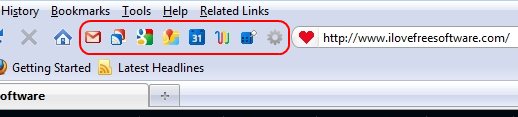
Here is the screenshot of Google Shortcuts for Chrome:

How to Use Google Shortcuts:
Following the download and installation, you will see icons appear beside the address bar. Clicking on anyone of these icons will take you directly to one of the many services. If you find that there are too many ‘services’ listed; clicking on the “Settings” option will allow you to configure this free utility to your requirements.
Indeed, from within the Setting environment, you are able to add and remove services whenever the mood takes you. There are also some unique buttons that you may find useful; two of these are the “Gmail This” and the “New Doc” buttons. The “Gmail This” option makes it possible for you to send a quick email of a text or image, directly from the website. Summarily, the “New Doc” allows you to quickly create a new document from within Google Docs.
It is important to note here that this handy shortcut utility is not only for Google services; you may also create your own shortcuts with a custom name or URL.
Also check out “My Shortcuts” Chrome extension, and other Chrome extensions.
The “Advanced Options” button is where you will find a slew of extra features. Such features include being able to define the layout of the shortcut application – either a horizontal or vertical toolbar. You can also convert the toolbar to a drop-down menu for all services. Feel free to reconfigure the tab behavior, as well as use Google Apps for all Google services. The Import/Export option lets you backup your settings as well as import from a different browser. NB: This Export/Import option is only available for Firefox; you cannot export Firefox Google shortcuts into Google Chrome.
Clearly, Google Shortcuts is a handy extension to have for those who use the Internet a great deal. It is completely user-friendly and if, made use of, will save you a lot of time. No more will you have to type web addresses into the address bar, everything you need, in the way of services, is just a click away. Don’t delay, download and set up this useful shortcut application today.
There is no doubt over the usefulness of this Google Shortcuts extension. It is highly configurable and could save you a ton of times typing the URL on your address bar. If you are not using it, go install it now.
You can download Google Shortcuts for Firefox, and Google shortcuts for Chrome.
